The best hidden camera for your home depends on whether you need a disguised device or a small security camera that can sit out of the way. Most cameras on this list are recognizable cameras. Their strengths are recording options and flexible placement, rather than a convincing disguise.
Our top pick is the Wyze Cam v4 for a compact camera with local recording. The Alpha Tech suits offline recording, while the Google Nest Cam offers battery placement away from an outlet. Below, we explain what each of the six cameras can do and where the compromises matter.
What Is the Best Hidden Camera for Your Home?
Start with three questions. Do you need to watch live from your phone, or review saved footage later? Is there a power socket near the camera? And does the camera need a disguise, or would a small visible camera do the job?
A camera that records to a memory card can suit a room without Wi-Fi. But that does not mean you can check it remotely. Likewise, a battery camera can avoid a power cable without providing continuous recording. These differences matter more than the word “spy” on the box.
Here are our six picks, followed by the reasons to choose each one.

6 Best Hidden Cameras and Compact Security Cameras
1. Wyze Cam v4
| Brand |
Brand
Wyze
|
| Camera Type |
Camera Type
Overt
|
| Connectivity |
Connectivity
Wi-Fi (2.4 GHz, Wi-Fi 6)
|
| Power |
Power
Mains (wired micro USB)
|
| Special Features |
Special Features
2.5K QHD, color night vision, spotlight and siren, IP65 weather resistant
|
| Best For |
Best For
Exposed outdoor locations with poor lighting
|
The Wyze Cam v4 is our first choice if you want a small camera with flexible recording options. It looks like a camera, so choose it for monitoring a room rather than for a built-in disguise.
It records 2.5K QHD video and offers color night vision. Its IP65 rating allows indoor or outdoor use, with the appropriate outdoor power adapter. You also get two-way audio, a siren, and a spotlight. The spotlight is worth considering if you want an unobtrusive setup: it adds light as well as drawing attention to the camera.
A compatible microSD card, up to 256GB, lets it record continuously without a subscription. You need to install the card and enable local recording; this is different from buying cloud video history. Wyze explains the distinction in its local recording guidance.
The main placement limit is power. The included micro USB cable is six feet long, and the camera uses 2.4GHz Wi-Fi despite supporting Wi-Fi 6. A shelf with no outlet nearby is a better job for a battery camera. There is also a two-pack if you want to cover two rooms.
2. Alpha Tech Indoor Camera
| Brand |
Brand
Alpha Tech
|
| Camera Type |
Camera Type
Discreet
|
| Connectivity |
Connectivity
None (offline, no Wi-Fi or app)
|
| Power |
Power
Continuous Plug-In
|
| Special Features |
Special Features
Local microSD storage up to 512GB, no subscription
|
| Best For |
Best For
Simple offline monitoring without an app
|
The Alpha Tech Indoor Camera is the option here for recording without Wi-Fi or a camera app. The linked 160-degree model uses plug-in power and saves footage locally to a microSD card, with support for cards up to 512GB.
That makes it a fit for reviewing activity later. It does not provide the remote live view or phone alerts you get from an internet-connected camera. You must also retrieve the recordings yourself, so consider how easily you can reach the card before choosing a location.
The Alpha Tech Indoor Camera has a wide view, but an outlet close to the floor may still give you a poor angle. Make a short recording and inspect it before leaving the camera in place. AlphaTech's no-Wi-Fi model instructions also explain that the card is sold separately and older footage is overwritten as it fills. Copy any clips you need to keep.
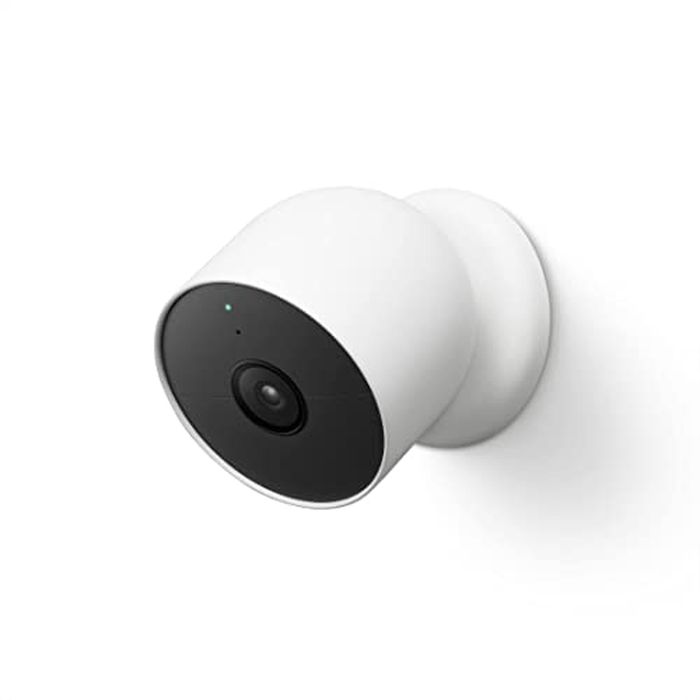
3. Google Nest Cam (Battery)
| Brand |
Brand
Google
|
| Camera Type |
Camera Type
Overt
|
| Connectivity |
Connectivity
Wi-Fi
|
| Power |
Power
Rechargeable Battery
|
| Special Features |
Special Features
Magnetic mount, works with Google Home and Alexa
|
| Best For |
Best For
Battery placement away from outlets, indoors or out
|
The Google Nest Cam (Battery) suits a location where a power cable would be awkward. Its rechargeable battery and magnetic mount give you more freedom to position it, though you still need to plan for charging and Wi-Fi coverage.
This model records up to 1080p HDR video. Its infrared night vision produces black-and-white video when Night Vision is on. It requires the Google Home app and a Google Account; it also works with compatible Google and Alexa devices.
Person, animal, and vehicle alerts are included. A Google Home Premium subscription adds features such as familiar-face detection and longer video history. Without a subscription, the included event history covers activity from the past three hours. That is a rolling window of event clips, not three hours of continuous footage.
Continuous video history requires both continuous power and the compatible Google Home Premium Plus plan. Google's battery-model specifications set out those requirements. Choose the Nest Cam for flexible battery placement, while keeping those recording limits in mind.
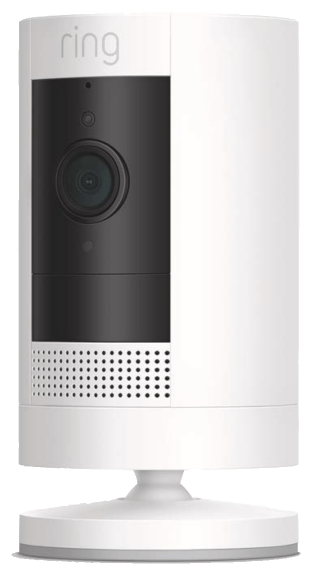
4. Ring Stick Up Security Camera
| Brand |
Brand
Ring
|
| Camera Type |
Camera Type
Overt
|
| Connectivity |
Connectivity
Wi-Fi
|
| Power |
Power
Battery or Mains
|
| Special Features |
Special Features
Works with other Ring cameras and doorbells
|
| Best For |
Best For
Homes already running Ring doorbells or cameras
|
The Ring Stick Up Cam is also sold as the Ring Outdoor Cam. Ring says the name changed while the features stayed the same. This is the 1080p model, so do not confuse it with the higher-resolution Outdoor Cam Plus.
Its main appeal is using the same app as your existing Ring cameras and doorbells. If you are adding it to another Ring device, check compatibility with any accessory you plan to use. The battery version can stand on a flat surface or mount on a wall without a permanent power cable.
The Ring Stick Up Cam gives you live view and motion notifications without a subscription. Saving and reviewing recorded video requires a compatible Ring subscription. Check that distinction before buying it to capture events while you are away: seeing a notification is different from having a saved clip to open later.
It remains a visible security camera. Choose it because it fits your Ring setup and placement needs, rather than expecting it to disappear among household objects.
5. Kasa 2K QHD Pan/Tilt Camera
| Brand |
Brand
Kasa
|
| Camera Type |
Camera Type
Overt
|
| Connectivity |
Connectivity
Wi-Fi
|
| Power |
Power
Mains (wired)
|
| Special Features |
Special Features
Pan/tilt tracking, subscription-free local storage
|
| Best For |
Best For
Indoor rooms needing a wider moving field of view
|
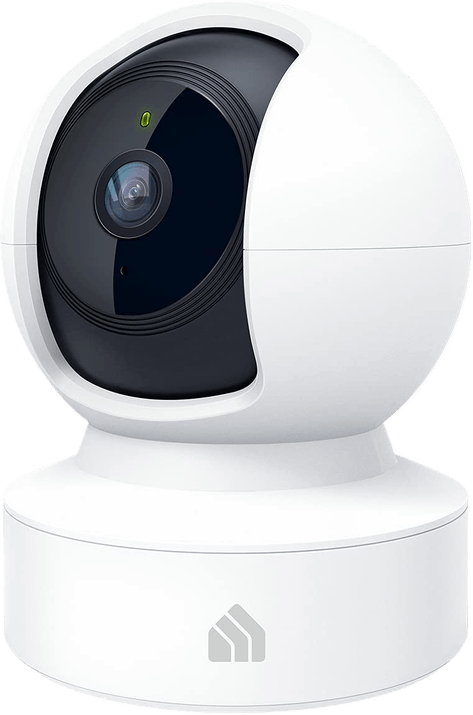
The Kasa 2K QHD Pan/Tilt Camera, model KC410S, physically pans and tilts to follow motion. That is its reason to be on this list: you can adjust the view around a room instead of relying only on a fixed angle.
It records 2K video and supports continuous local recording to a compatible microSD card. Kasa Care cloud storage is optional. It needs mains power, with a ten-foot USB cable included, so you must keep the outlet and cable route in mind.
The Kasa 2K Pan/Tilt Camera suits an indoor room where following activity matters more than concealment. Its movement can attract attention, and pan-and-tilt does not mean it records every direction at once. Keep the camera and its movement path unobstructed.
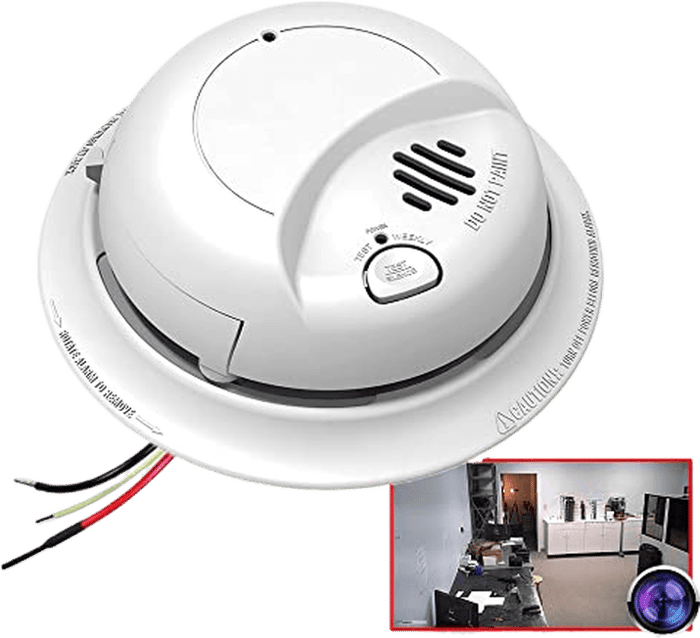
The Smoke Detector Spy Camera from AES Spy Cameras uses a smoke-detector-style housing. The linked listing identifies model SMK9120-1080, with 1080p video and a wired 120V AC power supply.
It is a different installation decision from putting a camera on a shelf. Check the exact model's mounting angle and wiring requirements before choosing a ceiling or wall position. Have a qualified installer assess the electrical connection. Do not replace or disable a required working smoke alarm to install a camera.
The maker's listing describes this Smoke Detector Spy Camera as video-only, with no microphone. It also describes Wi-Fi access for live video and stored recordings through a phone app. Read the instructions for the exact unit before installation, since similar-looking housings can contain different cameras.
Choose it only if a fixed, disguised installation meets your needs. A familiar shape can make a camera less conspicuous, but it cannot guarantee that nobody will notice it.
How to Choose a Hidden Camera
Decide how you need to retrieve footage. For a live view while you are out, choose a camera with remote access and check the Wi-Fi signal at its final position. For local recordings, check card compatibility, playback, and what happens when storage fills. Save a sample clip before you rely on the setup.
Separate continuous recording from event clips. Motion-triggered clips can leave gaps between events. Continuous recording can capture what happened before an alert, but it needs the right power and storage setup. Check the mode you actually intend to use, including what remains available without a subscription.
Check the view in daylight and darkness. A wide view is only an advantage if the subject is large enough to see. Place the camera temporarily, walk through the area, and review the recording. Check faces at the distance that matters to you. A resolution number alone does not establish whether a particular recording will identify someone.
Match the camera to its location. Keep the lens and moving parts unobstructed. Avoid enclosing a powered camera in a box or covering its ventilation. A visible camera with a sound mounting position can be a better choice than a concealed one with a blocked view.
What Are Spy Cameras For?
A camera can help you review activity at an entrance, check on a pet, or monitor a storage area you are authorized to oversee. Decide what you need to see before choosing the camera. You may find that an ordinary visible security camera covers the area with fewer placement compromises.
Consider other people's privacy as well as your own security. Check the rules for your location before recording people, especially conversations, workers, or visitors. Owning the property does not answer every privacy question. Avoid private spaces such as bathrooms and changing areas, and tell people about monitoring as required. For a UK example, the ICO's home CCTV guidance explains the duties that can apply when a camera records beyond your property boundary.
Hidden Camera FAQs
Can a Hidden Camera Work Without Wi-Fi?
Yes. The Alpha Tech model above records locally without Wi-Fi, but you need to access its saved recordings yourself. Do not assume that every camera with a memory-card slot works the same way: check whether its setup, playback, or recording functions still require an account or connection.
Can a Cell Phone Detect a Hidden Camera?
Sometimes it can show infrared light, but that is not a reliable way to rule out a hidden camera. Some smartphone apps offer checks, yet they cannot establish that a room has no camera.
Sony's infrared testing guidance explains that some phone cameras filter infrared light. A camera also needs to be emitting light for that particular check to find it. Treat a negative result as inconclusive.
Where Should I Place a Camera at Home?
Choose a position that shows the entrance or area you need to monitor, with permission and privacy in mind. Check the actual recording angle before fixing anything in place. A shelf, ceiling, or hallway can produce a very different view of the same space. Do not cover the lens or ventilation to hide the camera.

White and black versions of Wyze's compact home cameras
Conclusion: The Best Hidden Cameras
The Wyze Cam v4 remains our top compact pick for its recording options. It is a recognizable camera, so decide early whether a small security camera meets your needs or whether a disguised housing is essential.
Then choose by the practical limits: power at the mounting point, access to saved video, and the view of the area you need to cover. Test a recording in daylight and darkness before you rely on any camera. A good position and the right recording mode matter more than a promise that a device is hidden.