The best free photo printing apps allow you to order prints directly from your smartphone. There’s no faffing about with a computer, transferring files, or resizing images. All you need to do is enter the app, select the photos you want to print, and place your order. Then you just wait until they arrive.
Shutterfly is our favorite photo printing app. Available for iOS and Android, it’s an all-in-one photo printing service. The quality of the prints is fantastic, and they do everything from magnets to photo books. Everything is reasonably priced and the app is easy to use.
We have plenty more if that’s not the app for you. Keep reading to see all the best photo printing apps for iPhone and Android.

Best Photo Printing Apps for iPhone and Android
These are our top recommendations for the best photo printing apps for iPhone and Android phones.
You could buy your own photo printer to print photos at home. But these photo printing apps take the hassle out of photo printing. All you need to do is download the app and select the photos and products you want. They are also simple and cost-effective.
Pick by what you want to end up with. Shutterfly is the one-stop shop for prints and photo gifts. Snapfish is the cheapest way to print in volume. Mixtiles is for wall decor without a hammer. Mpix is for gallery-grade prints you plan to keep. Printastic is for photo books. And Lalalab and Nations Photo Lab are two apps that print straight from Instagram and Facebook.
The Shutterfly mobile app is exactly what you need if you’re looking to print photos directly from your smartphone. It’s available for both iPhone and Android devices. They also do far more than just photo prints.
Shutterfly offers a wide range of print sizes as well as different finishes, including gloss and matte.
You can have the images sent to your home address. Or you can have them sent to friends or loved ones saved in your address book in the app. The app also has reminders for special occasions like birthdays and holidays, so you never miss an important date.
If you don’t want to wait for delivery, you can collect your prints from a local Walgreens or CVS store. This is only beneficial if you have one nearby. But if you do, Shutterfly prints them for same-day pickup.
The print quality is consistently excellent. But Shutterfly does far more than printed photos. They offer framed photos or wall-mountable canvas prints.
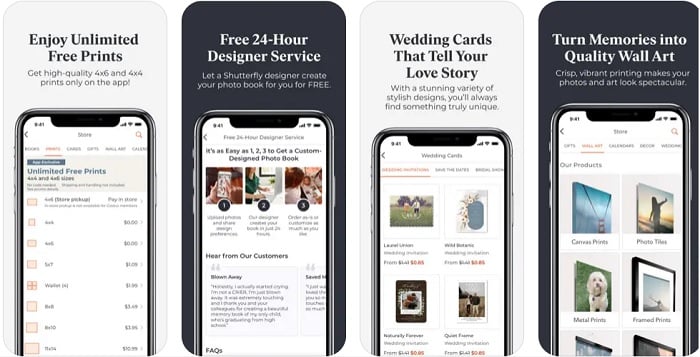
You can have your photos printed on stickers and greetings cards. You can have full photo books printed. And they have options for photo mugs, magnets, and cushions.
Shutterfly can also help you prepare for big events with customizable templates for birthday party or wedding invitations.
No other photo printing apps have such a large variety of printing options. The prices are also very reasonable, even when you include the postage fees. That’s why Shutterfly is our favorite photo printing app.
It is not the cheapest way to print, though. If all you want is a big stack of 4x6 prints, Snapfish gives you 100 of them free every month and Shutterfly does not.
Millions of people are downloading the app and having their pictures printed in a wide range of ways. It’s easy to use and reasonably priced. Every product is printed in Europe, though, so a US order takes longer to reach you than one from a domestic lab like Mpix or Snapfish.
The app allows you to print images directly from your phone’s photo reel. You don’t have to import, resize, or reformat. And thanks to the social media integration, you can print images directly from Instagram and Facebook.
Lalalab offers a wide range of photo products aside from prints. They have bespoke photo boxes for storing large numbers of prints. You can order personalized magnets, calendars, and cards. Larger media like posters and canvases are also available through the app.
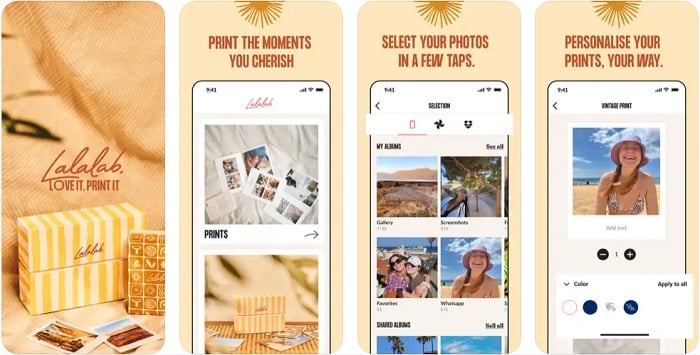
You have several payment options. You can save your card details to the app, or you can sync it with your PayPal account. Not only does this increase the user experience, but it also indicates your details are safe on the app.
When ordering prints and other photo products, you can have them sent to your address, someone else’s address, or a collection point near you. All packages are beautifully wrapped, making them suitable gifts for friends and family.
Mixtiles is a fantastic photo printing app that specializes in photo tiles.
These personalized tiles stick directly to walls, so you can easily redecorate your home with your favorite images. You don’t need to worry about being a DIY expert. The tiles go straight on the wall. No hammer or nails required.
There’s a selection of different tiles, frames, and styles you can choose from. You can also select images directly from your smartphone gallery. The only requirement is that the images are at least 499 x 499 pixels in size. But that won’t be a problem with modern smartphone cameras.
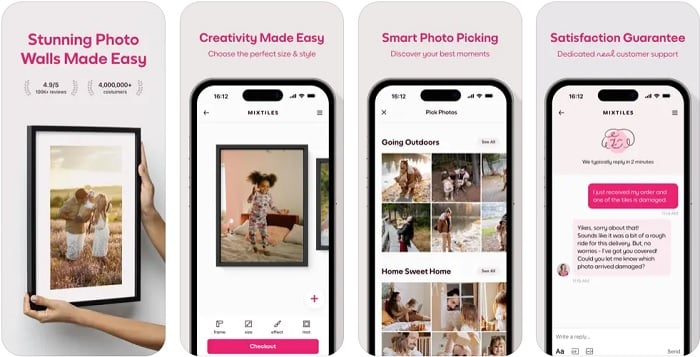
The app is completely free to download and use. And they have a helpful customer support chat line. That’s one of the reasons their customer satisfaction rating remains so high.
While not as versatile as the previous apps, Mixtiles is a specialist app for printing decorative photo tiles. If you want to decorate the home or personalize spaces, Mixtiles is a quick and easy solution.
It is the wrong app for loose prints, mugs, or greeting cards. Use Shutterfly or Snapfish for those.
Snapfish is another photo printing app that is booming in popularity. And that’s not surprising considering the wide range of products they offer.
Firstly, Snapfish offers 100 4×6 printed photos every month. You still have to pay for the shipping, but you’ll make huge savings if you want to print a high volume of photos.
But you’re not limited to 4×6 prints. They offer plenty of different sizes, including considerable enlargements.
As well as photo prints, you can apply your images to mugs, posters, and magnets. Canvas prints and photo tiles are also popular, but these are just a few of the print products Snapfish offers.
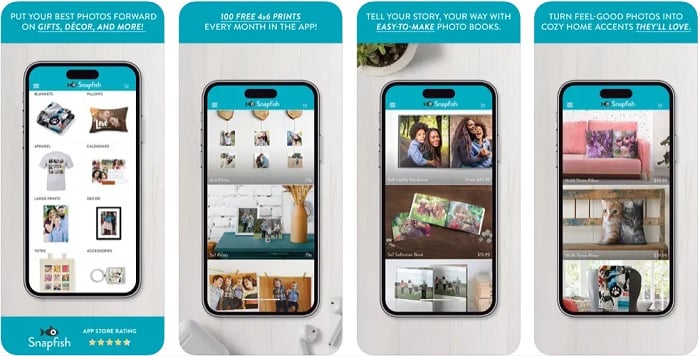
You’ll have every special occasion covered thanks to the personalized greetings cards on offer. Christmas, mothers’ day, and anniversaries are all covered.
You can have your purchases sent to any address you like. They even do special gift wrapping if it’s a gift for someone. You also have the option to collect your order from a local CVS or Walgreens, often within an hour.
Payment options include credit or debit cards, Apple Pay, PayPal, and Afterpay. This makes your life easier and gives you peace of mind in terms of cyber security.
Those 100 free prints are only free on the prints. Postage is charged per order, so a batch of five photos is not really a free order. Snapfish pays off when you print in bulk.
Mpix is the professional lab on this list. It is the consumer arm of Miller’s, Inc., a family-owned business in the American Midwest, and every order is printed and packed by their own team rather than farmed out to a partner.
That matters if you care what a print still looks like in ten years. Your photos go onto certified archival papers, and there are over 30 print sizes to pick from. Premium prints are ready to ship within 24 hours. Giclee prints are there if you want gallery-grade reproduction, and wallet prints come with free color correction.
The free app runs on both iPhone and Android, and it goes well beyond loose prints. You can order hardcover photo books, photo albums, framed prints, calendars, mugs, and holiday cards straight from your camera roll. It holds 4.8 stars from more than 36,000 App Store reviews.
Everything is printed in the Midwest and posted to you, so there is no counter to walk into the way there is with Shutterfly and Snapfish. The app is English only. And Mpix stays away from the novelty end of the market, so if you want stick-on photo tiles or a free monthly print allowance, this is the wrong app to download.
The Nations Photo Lab could be the best photo printing app if you’re printing straight from social media. The integrated tools allow you to select images from Google Photos, Instagram, and Facebook.
An easy-to-use interface makes it easy for anyone to print their favorite photos. That’s good news for elderly and tech-shy photo fans.
There are over 60 different print sizes to choose from. You can also choose between their three professional photo paper types.
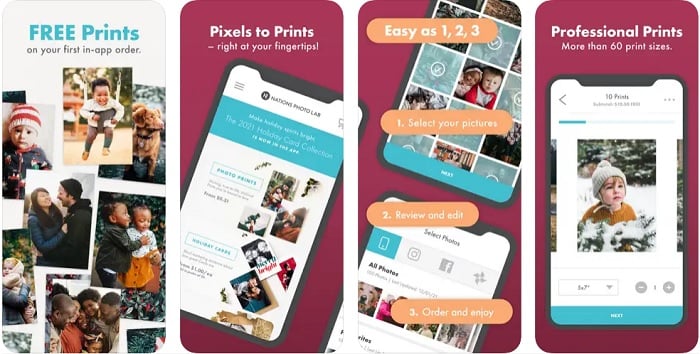
Basic edit tools help you improve the final product. You can zoom in or crop images, improving composition. This can help if you’re printing the images in a frame or on canvas for wall mounting.
As well as frames and canvases, you can have your images printed on metal plates.
Nations Photo Lab helps you stay connected to distant loved ones. You can send personalized cards and gifts through the app, allowing you to maintain connections even when far apart.
The app itself is the dated part. Its last iPhone update landed in May 2025, and it feels its age next to Shutterfly or Mpix. Come here for the social media imports and the paper choice, not for the interface.
Printastic is one of the newer photo printing apps on the scene. And although it’s only available for iPhones, Printastic’s popularity and reputation are growing all the time.
Selecting images to print is quick and painless. You can choose anything from your smartphone’s camera roll, Dropbox, Instagram, or Facebook.
The top-quality photo books are one of Printastic’s big draws. They are 21 x 21 cm hardcover books with anywhere between 24 and 200 pages, depending on how many images you select.
You can customize the photo books with different page layouts and cover options.
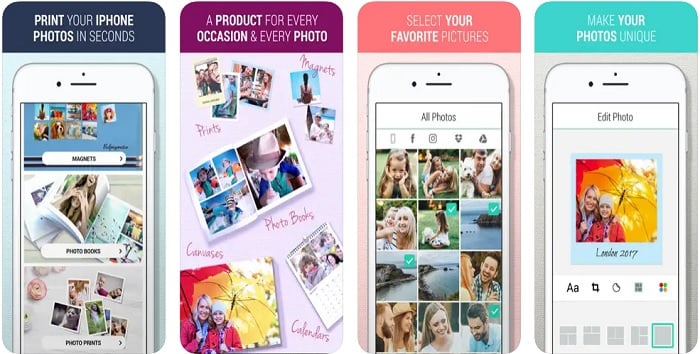
Personalized canvas prints, calendars, and magnets are all available through the app. And Printastic also has every special occasion catered for. You’ll never be lost for ideas when it comes to birthdays, anniversaries, or graduations ever again.
Shipping is affordable and reliable. And you can track every shipment from the moment you place the order to when the package arrives at your door.
It’s an international app that’s available in eight different languages, including English, Spanish, Bulgarian, and Russian. Photo printing has no borders with Printastic.
No borders, but only one platform. There is still no Android version, so Android users have to pick something else off this list.
Download: iPhone
Frequently Asked Questions
Which photo printing app is the cheapest?
Snapfish. Its app gives you 100 free 4x6 prints every month and you only pay the postage on them. Postage is per order, so print in batches to make it count.
Can I collect prints the same day instead of waiting for delivery?
With two of them. Snapfish prints for pickup at CVS and Walgreens, often within the hour. Shutterfly does same-day pickup at the same two chains. Every other app on this page posts your order to you.
Do all of these apps work on Android?
All of them except Printastic, which is iPhone and iPad only.
Conclusion
Printing photos from your smartphone has never been easier. Thanks to fantastic photo printing apps like the ones featured in this article, you can get gorgeous printed photos delivered right to your door. You don’t even need to get off your lazy behind. A few screen taps and the order is made.
Shutterfly is our top recommendation for a fast, reliable, and affordable photo printing app. It has an incredibly wide selection of custom products available. But they also do the basics well. Everything is of the best quality and shipments are always on time and in good condition.
But you don’t have to go for Shutterfly. All the other photo printing apps on this list are excellent too. Some have specialist products like photo books. Others have better social media integration. It all depends on what you need.
So download two of them. Take Shutterfly for the everyday prints and gifts, then whichever specialist matches the thing you actually want on the wall or the shelf. Order one small batch from each before you commit to a big print run. Paper stock and color rendering vary more between these labs than their sample images ever suggest.