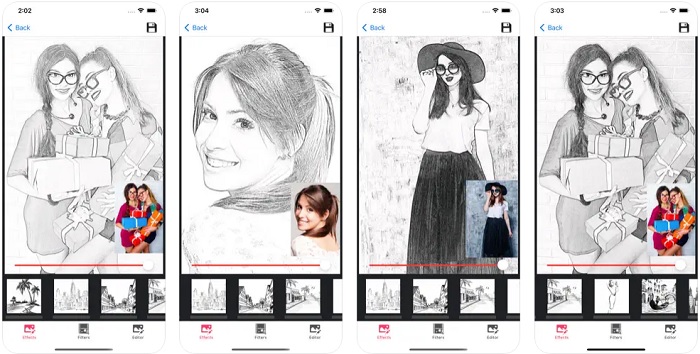
The best drawing apps for Android are a great way to do digital drawing. Back in the day, people needed a piece of paper and a pencil to draw. Nowadays, that’s not the only way of doing it. Having the best drawing app for Android on your phone or tablet allows you to draw whenever inspiration hits.
There are many apps to choose from. Some of them come with the basics and are designed for beginners. Others offer hundreds of tools for professional artists.
Infinite Painter is our top pick. It has the deepest brush engine on Android, and one purchase unlocks the whole app instead of a subscription. But it is not the right answer for everyone, so we say plainly who each of the other nine suits.
Whether you are looking for a drawing app to kill some time or for professional purposes, we are here to help. Along with paid ones, you will find the best free Android drawing apps that adjust to your needs.
10 Best Painting and Drawing Apps for Android
Drawing apps are an excellent tool for people dedicated to this style of art. The following list covers the best drawing and painting apps for Android.
1. Infinite Painter
Infinite Painter is our top pick for the best drawing app Android offers.
This app comes with nearly 200 brushes and allows you to create your own. It offers over 100 brush settings, so you can tailor the existing brushes and adapt them to your needs.
The app’s drawing tools are designed to resemble painting over real paper textures. This feature allows the users to paint realistically using a digital device. It is practical if you prefer traditional painting but can’t transport your canvas everywhere.
Infinite Painter comes with several useful tools. You can paint in layers, use Photoshop blend modes, or even draw 3D cityscapes with perspective guides.
Infinite Painter features a user-friendly interface. All tools and workflows are organized well. You will be able to use this software easily, even if you are not familiar with these apps.
Infinite Painter gives you a seven-day free trial of everything. After that the app keeps working, but the advanced features lock behind a one-time purchase. That is unusual and worth the money if you draw often, because nothing here renews monthly.
It is not the app to start with if you only want to doodle for five minutes. The tool set is deep enough to be intimidating, and a beginner is better served by Fossify Paint or Sketchbook further down this list.
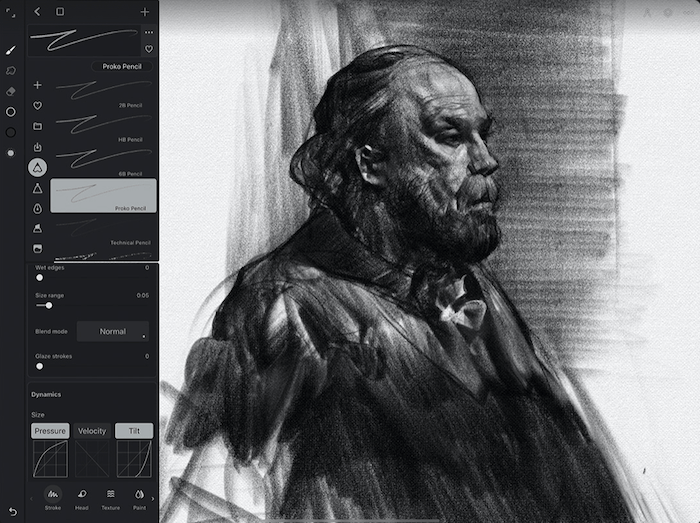
© Infinite Painter
2. Fossify Paint
Fossify Paint is one of the best apps for beginners. It is also a good option for kids, as it is easy to use. It is the open-source continuation of Simple Draw Pro, which was pulled from the Play Store.
This free app comes with different paint and pen sizes. It also allows you to set different background colors and pick exact shades with hex codes.
Fossify Paint allows you to easily share your sketches through social networks or messages. It supports JPG, PNG, or SVG vectors.
This app is not suitable for advanced digital arts. It doesn’t come with airbrushes, masks, or layers. But it’s still a good app if you are looking to have some fun doodling around.
Be clear about what it is. Fossify Paint is still published as a beta, and it is a small project with a young user base compared to everything else on this list. Take it for what it is, a clean and free sketchpad with no ads, and not as a replacement for a full art app.
3. Sketchbook
Sketchbook is one of those all-in-one drawing apps that’s worth a try. The app allows everything from simple sketches to professional artwork.
This award-winning app offers customizable tools that are great for artists and professional illustrators. Sketchbook features different brush types, layers, and blend modes. All brushes are fully customizable.
This drawing app also offers guides and rulers that provide precision for a professional job. The interface is elegant and simple. And it doesn’t come with ads!
The app offers the perfect place to focus on your work.
Sketchbook is free to download and carries no ads, which is rare at this level. Some tools sit behind in-app purchases, so treat it as a generous free app rather than a completely free one.
Sketchbook is now run by Sketchbook, Inc. rather than Autodesk, and it is the safest pick if you want a professional-feeling app without learning a professional interface. It is the wrong pick if you need vector output or comic panelling, which Concepts and MediBang Paint handle instead.
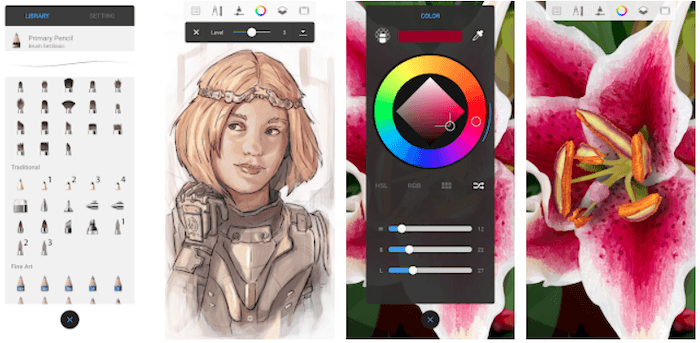
© Sketchbook
4. ArtFlow
ArtFlow is built for Android tablets first, and it shows. It comes with over 100 brushes and tools. And it supports pressure-sensitive pens, including Samsung’s S Pen, plus pressure simulation for finger drawing. These features make your painting experience more realistic.
This drawing app comes with some useful features such as Smudge, Fill, and Eraser tools. It features layer clipping and selection masks as well.
ArtFlow’s interface is intuitive and accessible. Although the app is meant for advanced users, the interface makes it easy to use for everyone.
The app supports PNG, JPG, and PSD formats, and it handles canvases up to 6144 by 6144 pixels with 50 layers.
ArtFlow is free to download, not a paid app. The advanced tools need a one-time pro licence bought in-app, and that licence covers every device on your Google account.
Two things to weigh before you install it. The free tier carries ads, and the app has had no update since July 2025, which is the longest gap of anything we recommend here. It still works, but if you want an app under active development every month, take Clip Studio Paint or ibis Paint X instead.
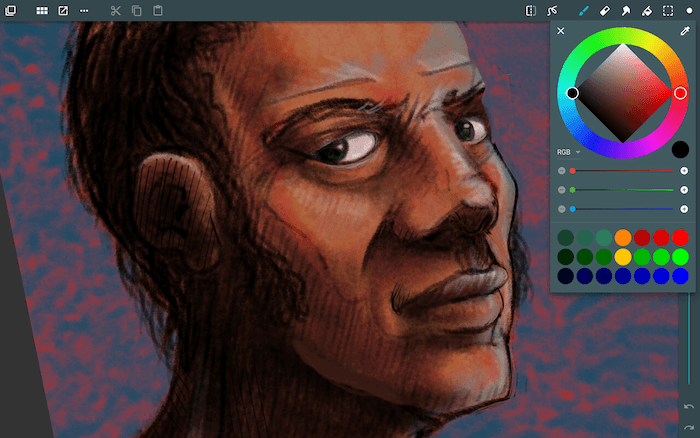
© Artflow
5. Clip Studio Paint
Clip Studio Paint is the app professional illustrators and comic artists actually use, and the Android version is the full program, not a companion app.
It handles work the rest of this list cannot. You can build up to 10,000 layers, pose 3D models when an angle defeats you, use Liquify across several layers to fix line art after the fact, and drive colour with gradient maps. There are vector layers for line work you want to reshape later, and a Puppet warp for adjusting a pose you have already drawn.
The brush engine is the other reason to take it seriously. You can customise texture, shape, dual-brush behaviour, and colour mixing to build your own, and the Clip Studio Assets store adds more than 70,000 brushes and 270,000 materials published by other artists.
The pricing is the catch, and it is a real one. Clip Studio Paint is a subscription on Android with a 30-day free trial, and on a tablet you need an active plan to save or export your artwork at all. On a phone you get 30 hours of full use each month for free with no ads. If you will not pay monthly, buy Infinite Painter or ArtFlow outright instead, because a lapsed Clip Studio plan on a tablet leaves you unable to get your own files out.
6. dotpict
dotpict is the most specific app on this list. It does one thing, pixel art, and it does it better than any general drawing app can.
The app is very easy to use. You just pick a color from the palette at the bottom of the screen and start drawing. Precise cursor controls let you place a single pixel exactly where you want it, and you can switch to drawing with a finger or stylus when you would rather sketch freely. Onion skin and animated GIF export let you build short animations too.
You can also look for inspiration in the app’s gallery, where other users post their art. Daily prompts and constrained challenges, like drawing a fox with four colors or a snowman in a 16 by 16 grid, are the reason people keep the app installed.
dotpict is free with ads and optional in-app purchases. It is the wrong choice for anything that is not pixel art. There are no soft brushes and no painterly blending here, by design.
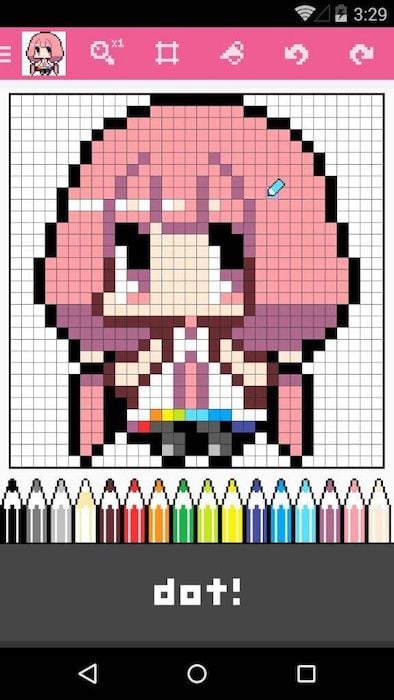
© dotpict
7. Tayasui Sketches
Tayasui Sketches is another one of the best drawing apps for Android devices. It comes with many tools perfect for digital artists.
Although it is sophisticated, it’s straightforward to use thanks to its user-friendly interface.
Tayasui is one of the best drawing apps you can find for creating realistic art. It ships with over 20 realistic tools, including a wet watercolor brush whose colors genuinely flow and blend, an acrylic brush, oil pastel, and a smudge tool. A brush editor and a color eyedropper let you mix the exact shade you want, and you can import photos to draw over.
Tayasui is one of the best Android apps for artists who wish to bring their art with them everywhere they go.
Read the pricing before you commit. The app is free to download, but layers and the extra tool variants are Pro features, and Pro is a weekly or yearly subscription rather than a one-time unlock. If you want layers without a recurring bill, Infinite Painter and ArtFlow both sell theirs outright.
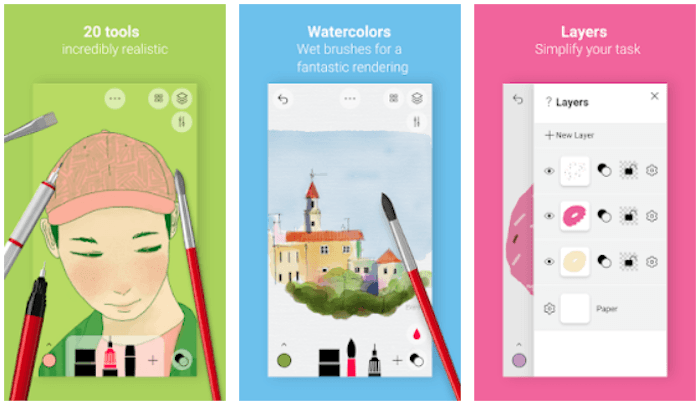
© Tayasui Sketches
8. MediBang Paint
MediBang Paint is a free drawing and comic-creation app built for illustrators, graphic designers, and artists who need panelling tools a general painting app does not have.
MediBang Paint comes with over 180 brushes, from pencils and pens to airbrushes and watercolors, plus a full layer system with cloud sync across your devices. It also includes comic-specific tools like screen tones, speech bubbles, panel templates, and over 60 fonts.
You can export your work as PSD, and it handles CMYK files, which matters if your pages are going to print. The app is actively updated, with new brushes and features shipping through 2026.
MediBang Paint is free to download and the free tier is genuinely usable. It does carry ads, and the 700-plus extra brushes need a subscription. If you draw comics or manga this is the best free starting point on Android. If you never draw panels, the comic tooling is clutter and Sketchbook is the cleaner app.
9. ibis Paint X
ibis Paint X is one of the most versatile drawing apps for Android. It features many functional tools like unlimited layers, 84 filters, over 3,000 fonts, 27 blending modes, clipping masks, and more.
The brush library is the largest here by a wide margin. It runs to over 105,000 brushes, covering airbrushes, pencils, oil brushes, crayons, charcoal brushes, dip pens, and digital pens, backed by 29,000 materials and stroke stabilisation for steady inking.
This app allows you to record your drawing process and share it with other users. It offers tutorial videos on its YouTube channel that will help you take full advantage of the software.
ibis Paint X is free to download with ads, and a Prime subscription on monthly or yearly terms removes them and unlocks the rest. It is the app to pick if you want maximum choice for nothing up front. It is the wrong one if choice paralyses you, because 105,000 brushes is a lot to wade through when you only wanted a pencil.
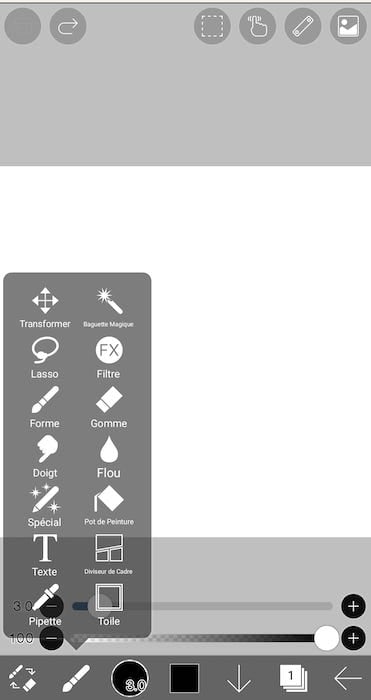
© ibis Paint X
10. Concepts
Our last recommendation for the best drawing apps for Android is Concepts. It is a vector-based sketching app with an infinite canvas, so you are never boxed in by a fixed page size.
It features pressure- and tilt-sensitive pencils and pens, an adjustable layering system, and Nudge, Slice, and Select tools that let you reshape a sketch without redrawing it.
Because every stroke stays vector, you can scale a sketch up with no loss of quality, which no other app on this list can do. That makes it the one to reach for when a drawing has to survive being resized, printed, or handed to a designer.
Concepts is free to download, with a seven-day premium trial. After that you choose: a subscription, or a one-time Essentials purchase that unlocks selection and editing tools, infinite layers, shape guides, and exports to PNG, PSD, SVG, and DXF. The one-time option is tied to the platform you buy it on, so an Android purchase does not carry to an iPad.
This drawing app is perfect if you draw as a hobby or use sketches to plan out other work. It is the wrong pick for painterly work. Vector strokes stay crisp and flat, so for watercolor and oils go back to Infinite Painter or Tayasui Sketches.
How to Choose a Drawing App for Android
Ten apps is a lot to weigh up, so work backwards from what you want to make.
You want one app to do everything. Start with Infinite Painter. It has the deepest brushes here and you buy it once. Sketchbook is the alternative if you want a calmer interface and are happy to stay on the free tier.
You are drawing comics or manga. MediBang Paint is the free answer, with screen tones, panels, and speech bubbles built in. Clip Studio Paint is the paid answer and the industry standard, as long as you accept a subscription.
You are sketching to plan something else. Concepts is the only vector app here, so your sketch scales cleanly and stays editable stroke by stroke.
You want pixel art or game sprites. dotpict, and nothing else on this list comes close.
You want to paint with realistic media. Tayasui Sketches has the best watercolor behaviour. ArtFlow is the tablet-focused option with a one-time unlock.
You just want to doodle for free with no ads. Fossify Paint, and accept that it is a beta with no layers.
You want the biggest library for nothing up front. ibis Paint X, with over 105,000 brushes and ads on the free tier.
One more rule that saves money. Check the pricing model before the feature list. Infinite Painter, ArtFlow, and Concepts sell a one-time unlock, while Clip Studio Paint, Tayasui Pro, ibis Paint Prime, and MediBang’s brush packs all renew. On a tablet, a lapsed Clip Studio plan stops you exporting your own artwork, so that one deserves a decision rather than a free trial you forget about.
Frequently Asked Questions
What Is the Best Free Drawing App for Android?
Sketchbook, because it pairs a professional tool set with a free download and no ads, which no other app here manages at once. ibis Paint X gives you far more brushes for free but shows ads, and MediBang Paint is the better free choice if you are drawing comics.
Do Any of These Drawing Apps Work Without a Subscription?
Yes. Infinite Painter, ArtFlow, and Concepts all sell a one-time purchase that unlocks the app permanently. Fossify Paint is free outright with nothing to buy. Clip Studio Paint is subscription-only on Android, and Tayasui’s Pro tier renews weekly or yearly.
Which Drawing App Is Best for Beginners?
Fossify Paint if you want the simplest possible sketchpad, and Sketchbook if you want room to improve. Both are free to start, and neither buries you in tool panels the first time you open them. Leave Clip Studio Paint and Infinite Painter until you know what you want from a brush.
Do You Need a Stylus for These Apps?
No, every app here works with a finger, but pressure-sensitive drawing changes the result. ArtFlow supports Samsung’s S Pen and simulates pressure for finger strokes, Concepts reads pressure, tilt, and velocity, and Infinite Painter is built around stylus pressure and tilt. If your tablet came with a pen, use it.
Can You Move Artwork to Photoshop From Android?
Yes, if you pick the right app. ArtFlow, MediBang Paint, and Concepts all export PSD files with your layers intact. Concepts also exports SVG and DXF for vector work. Fossify Paint exports PNG, JPG, and SVG but no layered files, and dotpict gives you flattened PNG or an animated GIF.
Conclusion: Best Drawing Apps for Android
Drawing apps are an excellent alternative for artists and drawing enthusiasts alike. They offer tools that make digital art resemble realistic drawings and paintings. They also allow you to draw and paint with many types of pens, brushes, and techniques. And you don’t have to bring your actual drawing kit with you!
Here is what to do next. Install Infinite Painter and use the seven-day trial properly, because that is the only way to know whether its brushes suit your hand. Add one specialist alongside it, whichever your work needs, whether that is dotpict for sprites, Concepts for plans, or MediBang Paint for panels. Then draw the same subject in both and keep the one you reach for without thinking.
Are you looking for creative photographic inspiration with minimal gear and setup? Grab our Creative Photography Cookbook e-book for cool, unusual, and magical ideas.