

A CR3 file is a Canon RAW photo. It stores image data for processing in a RAW editor. To open one, use Canon Digital Photo Professional or an Adobe app that supports your camera model. To share the finished photo, export a JPEG and keep the CR3 original.
The .cr3 extension does not mean your photo needs converting to RAW: it already is RAW. Here is what the format means and how to open, edit, and convert it.
What Is a CR3 File?
File extensions are the letters after the final dot in a filename. For example, IMG_0123.CR3 is a Canon RAW image. CR3 follows Canon's older CR2 format and is used by cameras including the Canon EOS R5.
A RAW file gives you more control over processing than a camera-produced JPEG. You can choose the white balance and adjust tones before exporting the finished image.
CR3, RAW, and C-RAW: What Is the Difference?
CR3 is the file format; RAW and C-RAW are recording options on compatible Canon cameras. Both use the .cr3 extension.
- RAW uses lossless compression to retain the captured image information.
- C-RAW means Compact RAW. It keeps the full pixel resolution but uses lossy compression to make a smaller file.
The saving is not a fixed percentage for every photo. Canon explains that differences are usually small, but C-RAW can show more noise when you strongly brighten an underexposed image. Choose RAW if you want the most room for that kind of adjustment; consider C-RAW when smaller files matter.
CR3 arrived with the EOS M50 and DIGIC 8 generation. It is no longer a new format, and a DIGIC 8 processor is not a requirement for every camera that uses it.

How to Open a CR3 File
Start by checking the camera model, not just the .cr3 extension. Software that opens files from one Canon camera may need an update for another.
On Windows or Mac
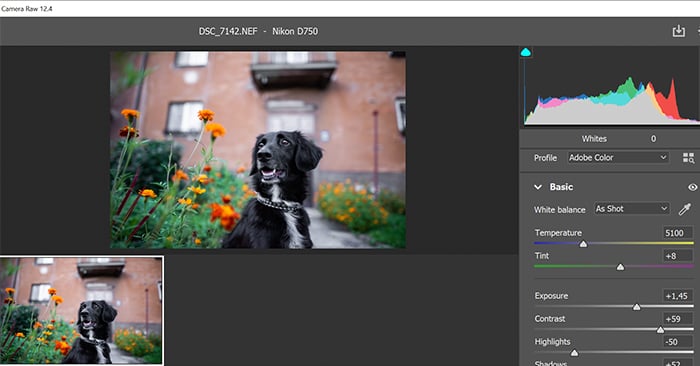
You can use Adobe Lightroom, Lightroom Classic, or Photoshop with Camera Raw. Check your model in Adobe's supported-camera table. It gives separate minimum versions for Camera Raw, Lightroom, and Lightroom Classic.
For example, the EOS R5 requires Camera Raw 12.4, Lightroom 3.4, or Lightroom Classic 9.4 or later. Use the minimum version for your own camera; CR3 support has no single minimum that covers every model.
Import the files into Lightroom. In Adobe Photoshop, choose File > Open and select the CR3. Camera Raw opens first so you can adjust the photo before opening it in Photoshop. Photoshop Elements also depends on compatible Camera Raw support.
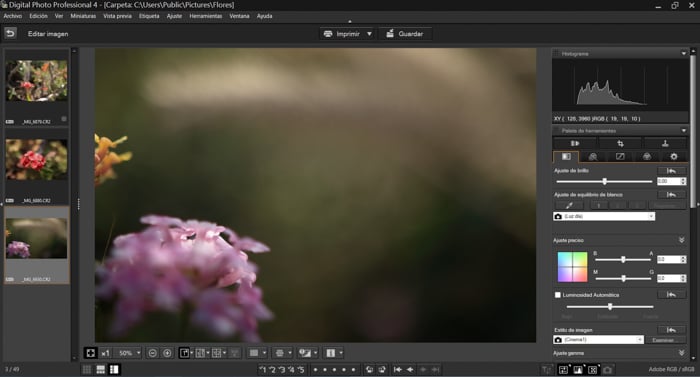
Canon Digital Photo Professional (DPP) is another option for Windows and Mac. Download the version listed for your camera and operating system from Canon's support site, then open the folder containing your photos. Canon supplies DPP for processing its RAW files without needing Adobe software.
On a Mac, Photos can also work with supported RAW images. Support depends on your camera and installed macOS version. If Photos cannot open the file, try an updated RAW editor instead of assuming the image is damaged.
On iPhone, iPad, or Android
Lightroom for mobile can import camera RAW files, with a subscription that includes RAW editing. Adobe documents direct import from a camera or card reader. Check camera support and use a compatible cable or reader for your device.
If a CR3 File Still Will Not Open
Update your editing app and check its camera support list. If the camera is supported but the file fails, try another image from the same camera and copy the affected file from the card again. This helps separate a compatibility problem from a transfer problem.
If your older Adobe editor cannot open the camera's files, Adobe DNG Converter may provide a route. It must support the camera too. Renaming .cr3 to .jpg or .cr2 does not convert the image.
How to Convert CR3 to JPEG or DNG
Use JPEG for an easy-to-share finished photo. Use TIFF when the next editing or printing step asks for it. Use DNG when you need a RAW file that works with your editing software. See our DNG versus RAW guide for the wider trade-offs.
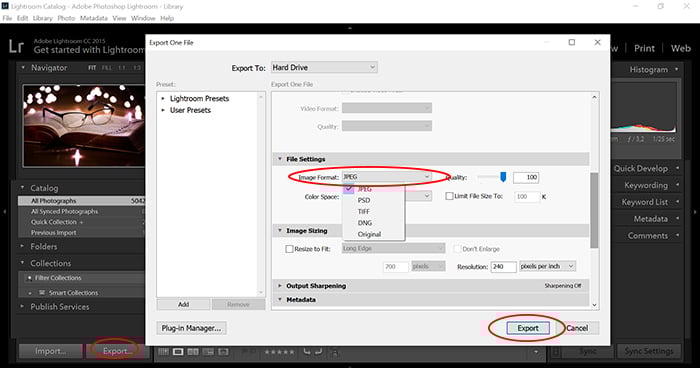
Export a JPEG in Lightroom Classic
- Select the photo or photos you want to export.
- Choose File > Export.
- Select a destination folder. Under File Settings, choose JPEG.
- Set the required quality and image dimensions, then click Export.
Adobe's export guide also covers TIFF, DNG, and other output formats. Export creates files for the next use; keep the original CR3 for future edits. The controls differ between Lightroom and Lightroom Classic.
Convert to JPEG or TIFF in Canon DPP
Select an image, then choose File > Convert and save. Choose the image type, filename, and destination. For several images, select them and use File > Batch process. Canon's DPP manual describes these conversion options.
Convert to DNG for an Older Adobe Editor
Use Adobe DNG Converter on Windows or Mac:
- Choose the folder containing your CR3 files.
- Choose where to save the DNG copies.
- Set the compatibility preference for your older editor.
- Click Convert.
You do not need DNG just to edit a supported CR3. Keep a backup of the original files, especially if you also use Canon software. Adobe notes that conversion can omit some proprietary camera metadata.
Is CR3 Better Than JPEG?
For substantial photo editing, CR3 gives you more flexibility to adjust white balance and tones. A JPEG is already processed by the camera and is convenient when you want a finished image to share.
Working on a RAW file in a RAW editor lets you revise adjustments without repeatedly recompressing a finished JPEG. But RAW does not guarantee a good exposure or unlimited recovery. Choose the format for your workflow; our RAW versus JPEG guide explains the practical differences.

Conclusion
A CR3 is already a RAW photo. Use software that supports the camera that took it, keep the original, and export the format you need. DPP or Lightroom can make JPEG copies; Adobe DNG Converter can help when an older editor needs DNG.
Now that you have your RAW files converted, try out our Effortless Editing course to master all the secrets of professional editing in Lightroom.