
The 180 degree shutter rule is a simple but effective way to create cinematic motion blur in your videos. This rule sets the exposure time to half the interval between frames. So if you’re shooting at 24 frames per second, use a shutter speed of 1/48 of a second.
What Is the 180 Degree Shutter Rule and Motion Blur?
Motion blur is linked to the shutter speed of any given photograph of any given scene. Imagine you want to capture a sports match, and you want to freeze the subjects, as not to show any blur.
You would use a shutter speed of 1/1000th of a second.
This number can go higher for faster moving subjects. The distance the moving object is from your camera also plays a role. Closer subjects moving at a medium speed will seem faster than a faster subject farther away from your camera.
Now imagine you want to photograph the same sports match, but you want to capture that sense of movement. You would drop the shutter speed to something lower, such as 1/125th of a second.
Each subject and its relative speed will need different shutter speeds.
Consider the below image as our example.
The first pinwheel has a shutter speed of 1/10th of a second. The abundance of motion blur stops us from seeing the subject as it is.
The second has a shutter speed of 1/50th of a second and is a little more pleasing to the eye. We can tell what it is, and we have a good amount of motion blur.
The third pinwheel has a shutter speed of 1/200th of a second, and only presents a minute amount of motion blur.
The fourth has a shutter speed of 1/800th of a second and has no blur at all. In fact, it looks still.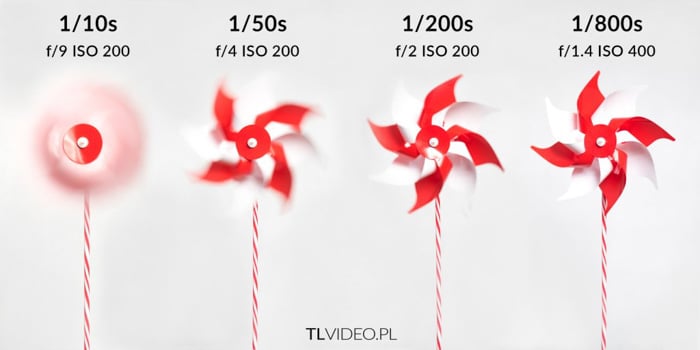
Cinematic motion blur is all about how much motion blur is enough. It disregards the settings that give us not enough and too much respectively.
Here, the 1/50th of a second shutter speed is perfect.
You need to understand that every situation will be different.
Shutter Speed vs. Shutter Angle
There are two areas present in the capturing of motion blur. One is the shutter speed, and the other is the shutter angle.
You might not have heard of shutter angle before. It’s an old filmmaking term. Since time-lapses create videos, it will be important to know.
We know about the shutter speed. It is how long your shutter stays open to record the scene. Well lit areas require the shutter to stay open for a shorter period of time. Low light areas require the shutter to stay open for longer periods.
These are of course offset by the other camera settings. And whether you want to achieve specific results, such as motion blur through what we know of as a long exposure.
The shutter angle comes down to the size of the shutter. In former times, when every motion picture used film, there had to be a shutter mechanism.
This shutter mechanism allowed the reel of film to move to the next frame. All without becoming exposed.
In photography, the shutter closes and reopens with every shot.
In filmmaking, scenes were usually captured at rates of 24, 25, and 50 frames a second.
The film plane stayed open. But a film mechanism covered the frame for the next exposure without it becoming overexposed. See the GIF below for a better understanding.
180 Degree Rule
Film cameras such as the ARRICAM stop at a 180° shutter angle, while digital cinema cameras such as RED’s go up to 360°. A film camera has got to have that time to move the film down for the next exposure.
You can, of course, go to smaller angles, such as 90° (1/96s for 24fps), but these are used for specific situations.
We keep the 180° angle because it feels more natural to the human eye.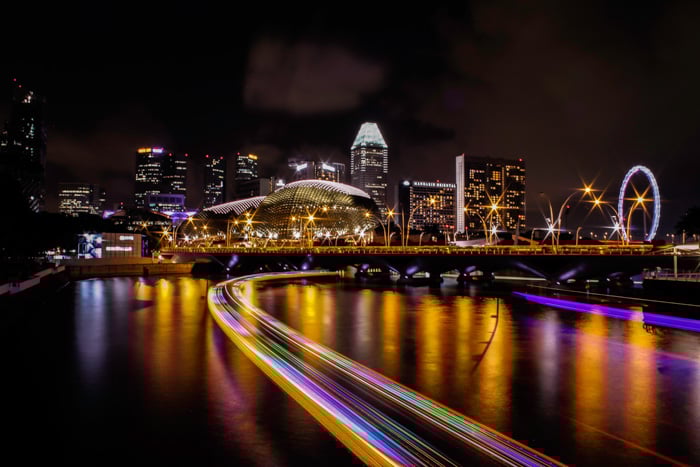
Choosing the Right Shutter Angle
When it comes to making our time-lapse video, we already know the end result is a succession of still images. You need to take each image separately.
We need to think about the shutter speed for each frame. And find one that will give us a realistic video once stitched together.
At 25fps, a shutter speed of 1/50th of a second gives video the motion blur associated with a 180-degree shutter angle.
Unlike still photography, a video without blur can look odd to the viewers. This is because the human eye does see the motion blur.
Looking at our pinwheel again: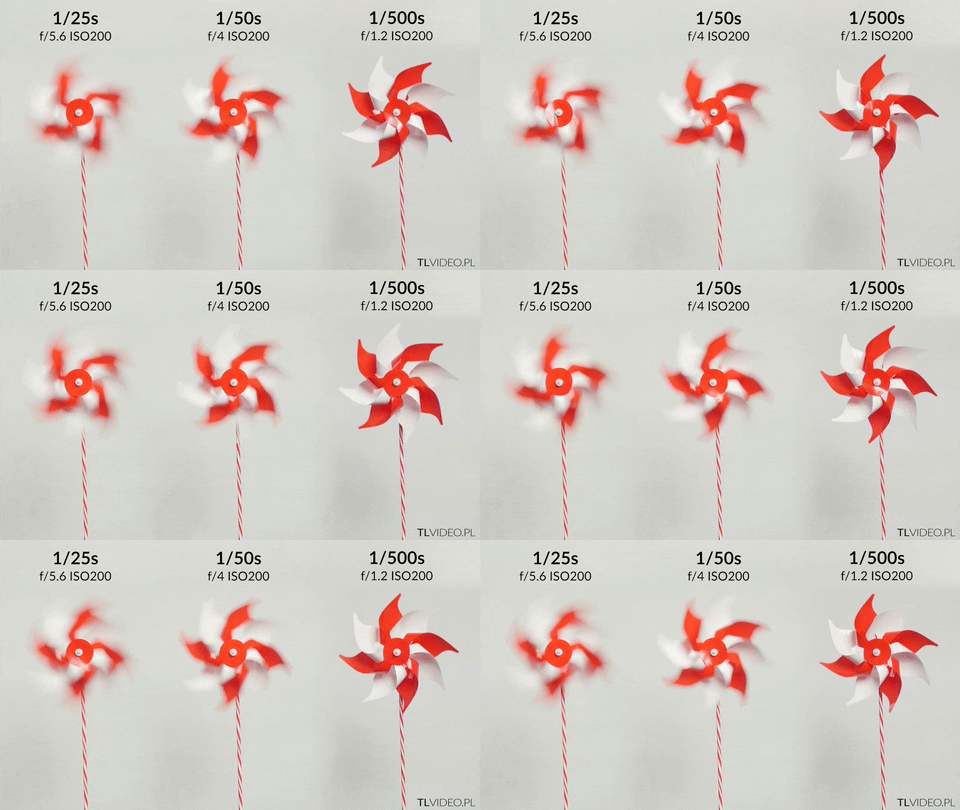
Here, we are capturing three pinwheels, all at 25fps. The shutter speeds are different.
The first has a shutter speed of 1/25th of a second (360°), the second has 1/50th (180°) and the third has 1/500th (20°). The 180° pinwheel captured at 1/50th is more natural than the others.
Applying the 180 Degree Rule to Time-Lapse Photography
So we know that the 180 Degree rule allows us to capture images that are the most natural to the human eye. But how do we put this into practice with time-lapse photography?
When we photograph a scene for a time-lapse video, we talk about intervals. This setting determines how often the camera takes a picture. A 2-second interval captures one frame every two seconds.
To keep the 180 Degree rule, we need to think about the shutter speed. The simplified version is the frame interval, in our case two, divided by two (as 180 is half of 360). This gives us (2 / 2 = 1) a shutter speed of 1 second.
With a start-to-start interval of two seconds, a one-second exposure follows the 180 Degree rule. If your intervalometer instead measures the delay after each exposure, set that delay to one second.
For the 180 Degree rule, use a one-second exposure within a two-second start-to-start interval. If your intervalometer measures the delay after each exposure, use a one-second delay.
Conclusion
The 180 Degree rule provides us with a realistic touch to our time-lapse images. And to our videos.
You can, of course, shoot at different shutter speeds and shutter angles. These will provide you with different effects.
Each scene is different. Perhaps you tried the cinematic blur and decided it’s not for you. This isn’t a rule as in you need to follow it, but rather a guideline for creating pleasing images.
You can even use this rule for single images, to give them extra flair.