Are you looking for the best phone gimbals? Look no further! This article explores the eight best phone gimbals you can buy this year.
From the Hohem iSteady Pro 2 gimbal to the Zhiyun Smooth 4 gimbal, we’ll cover the features and benefits of each product. The DJI OM 6 Smartphone Gimbal is our top choice. It’s easy to use, works with most phones and has many shooting options. But we’ve included several alternatives to give you the best selection of phone gimbals.
What Are the Best Phone Gimbals?
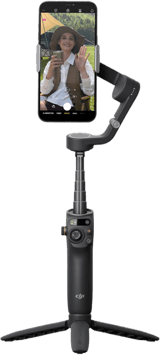
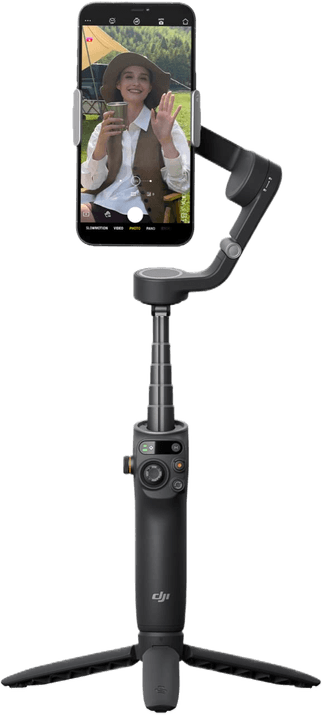
The best phone gimbal is the DJI Osmo Mobile 6. It has three-axis stabilization, a built-in extension pole, and DJI's Mimo app for subject tracking, panoramas, and ShotGuides templates.
A gimbal is a device with motors and sensors that allows your camera to rotate smoothly around an axis. It stabilizes your camera while you tilt, pan, and roll and helps you film fluid, steady footage when you’re moving. So it helps with shaky hands!
The best phone gimbals are a godsend for making video footage look professional. And it all comes down to three-axis stabilization motors that eliminate camera shake.
The traditional gimbal market leaders are DJI and Zhiyun. These brands top our list. But some excellent alternatives are worth your consideration. Here’s a quick peek at our list. You’ll find more information on each phone gimbal in the section after.
The Best Phone Gimbals in Detail
All the smartphone gimbals on our list have three-axis stabilization. It smooths out camera movements and buoys their electronic image stabilization. And they’re all compatible with iOS phones and Android devices. But remember that these devices aren’t meant to hold action cameras, mirrorless cameras, or DSLRs!
The DJI Osmo Mobile 6 Gimbal is a two-in-one combination of a lightweight gimbal and a selfie stick. It boasts all the usual gimbal features. But it has the added benefit of shooting from a higher or lower angle or turning the camera around to create a better selfie.
The phone is attached to the gimbal using a magnetic phone clamp in a unique magnetic mounting system. On the grip itself, there are a limited number of buttons and controls:
- Front joystick, record and rotate buttons
- Side zoom slider and power button
- Back trigger and USB-C port
The DJI Mimo app controls the gimbal and gives you access to various features, including Active Track 6.0, CloneMe pano, and video modes. The latter includes story mode templates, dynamic zoom, time-lapse, motion-lapse, hyper-lapse, and panoramas. There’s also a SpinShot gimbal movement mode.
The ShotGuides menu includes stylized clips designed to create a more cinematic feel without too much effort on your part. You can launch ShotGuides by tapping the icon in the DJI Mimo app. But the window also automatically appears if you’re in video mode and point the camera at your subject.
ShotGuides is divided into various sections, each containing several different options. The Chilled section, for instance, includes seven different scenarios. It includes options like Nostalgia and Summer Days.
If you shoot six clips and tap the video generation icon, the app enables Shot Reel and creates a video for you. By attaching a fill light phone clamp, you can add fill lighting with many brightness options and color temperature levels.
2. Hohem iSteady
| Brand |
Brand
Hohem
|
| Dimensions (Folded) |
Dimensions (Folded)
12 x 4.5 x 4.3 inches / 30 x 11 x 10.8 cm
|
| Weight |
Weight
1 lb / 490 g
|
| Smartphone Size |
Smartphone Size
2.3 x 3.5 inches / 5.8 x 8.9 cm
|
| Battery Life |
Battery Life
12 hr
|
| Extension |
Extension
No
|
| Key Features |
Key Features
Long battery life, 600-degree panning, and facial recognition and tracking
|
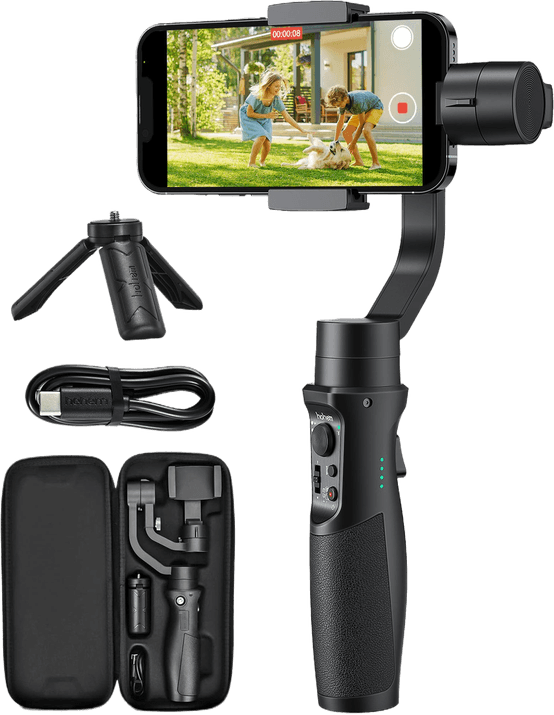
The Hohem iSteady is a mid-range, black, metallic alloy phone gimbal. It was designed to compete with the FeiyuTech Vimble 2S and Moza Mini S. It’s an upgraded version with an adjustable roll arm and trigger button.
Here is the arrangement of the buttons and controls on the grip:
- Front joystick, mode and power buttons, T / W switch (Telephoto / Wide-angle), and two LEDs (for Bluetooth connection and mode)
- Side LED indicators (four), microphone screw hole, micro USB charging port, and USB-A port
- Back trigger button
It offers four shooting modes—Pan Follow (PF), Pan and Tilt Follow (PTF), All Lock mode (AL), and All Follow (AF). The Hohem Gimbal app—which can be temperamental—controls everything else.
Six modes are available—Standard, Slow Motion, Motion-lapse, Time-lapse, Long Exposure, and Light Trail. Stabilization is quick and smooth, including panoramas, and all the usual features are present.
It is also possible to customize all the most crucial exposure, camera, and gimbal settings. This includes exposure value (EV), ISO, white balance, resolution, and shutter sound. You also control video stabilization, zoom speed, follow speed, and joystick speed.
The DJI Osmo Mobile 8 is DJI’s current phone gimbal and the most capable one on this list. The magnetic clamp snaps your phone on and off in about a second, so you can take a call without rebalancing the whole rig.
Two things separate it from the cheaper models here. The first is the built-in folding tripod, which opens out into a 21.5 cm extension arm. That is enough reach to lift the camera over a crowd, push it back for a group shot, or swing it round for a panorama. The second is ActiveTrack 8.0, which holds onto a subject far more stubbornly than the tracking on the older gimbals below. It also tracks pets, and it supports Apple DockKit, so it can drive subject tracking inside other apps and not only DJI’s own.
The Mimo app covers the modes you would expect, including time-lapse and hyper-lapse. And it will handle light edits on your phone before you post.
Battery life is around 10 hours, and it weighs 370 g. That is heavier than the Zhiyun Smooth Q3 below, and you notice it on a long handheld shoot. But if you want one gimbal that will not be the thing holding you back, and no more camera shake, this is it.
4. Zhiyun Smooth Q3
| Brand |
Brand
Zhiyun
|
| Dimensions (Folded) |
Dimensions (Folded)
1.8 x 6 x 7 inches / 4.5 x 15.4 x 18 cm
|
| Weight |
Weight
0.74 lb / 340 g
|
| Smartphone Size |
Smartphone Size
2.8 to 3.5 inches / 6 to 8.8 cm
|
| Battery Life |
Battery Life
7 to 15 hr
|
| Extension |
Extension
Yes
|
| Key Features |
Key Features
Built-in time-lapse and hyper-lapse modes, smart tracking features, and analog joystick
|
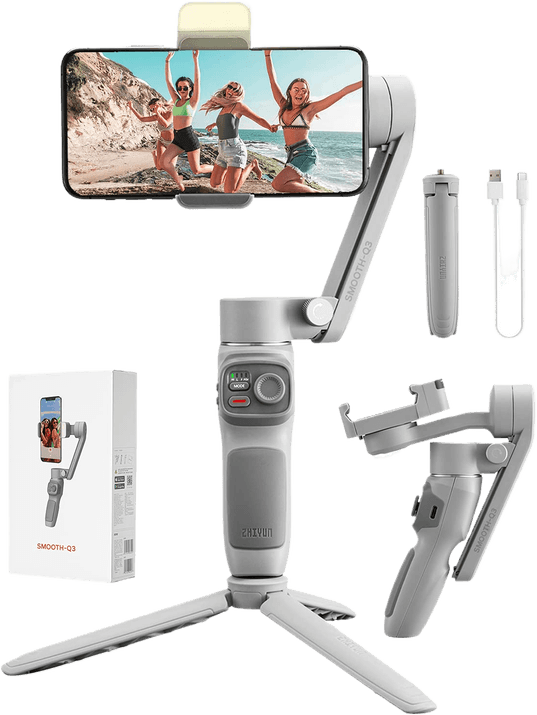
The unique selling point of the Zhiyun Smooth-Q3 is its built-in reversible fill light. It has three brightness levels and is very helpful if you want to vlog or take selfies in low light. There are also the usual controls on the grip:
- Front indicator lights, mode button, capture button, and joystick
- Side USB-C charging port and zoom rocker
- Back trigger button and power button
The ZY Cami smartphone app offers live streaming. Plus, it provides creative shots with gesture control, instant dolly zoom, time-lapse, and hyper-lapse. The Smart Follow subject tracking and panoramic modes are particularly impressive. And there’s also a MagicClone pano that lets you appear several times in your shots!
The app lets you edit your video by adding music, subtitles, filters, and stickers. You can also change the playback speed, reverse the video, zoom, rotate, change colors, etc. You can also buy a combo package, including a storage bag, wrist strap, and ZY Cami’s one-year prime service card.

The DJI Osmo Mobile 7P is the step-up model in DJI’s Osmo Mobile 7 generation, and it sits between the Zhiyun Smooth Q3 and the Osmo Mobile 8 on price.
Its headline feature is native tracking. The subject tracking runs on the gimbal itself rather than inside DJI’s app, so it keeps following you in other camera apps as well. That is the single biggest practical difference between this and the older gimbals here, most of which only track inside their maker’s own app.
If you want DJI’s tracking without paying for the Osmo Mobile 8’s extension arm, this is the one to look at. You do not get that arm, so you lose the overhead and group-shot reach the 8 gives you.
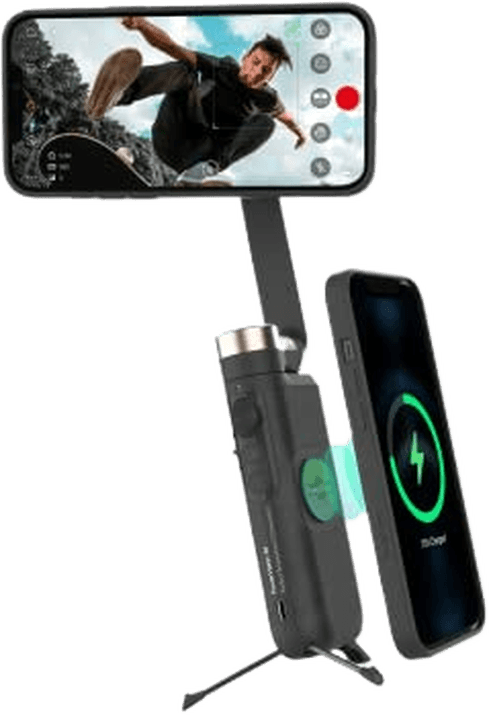
The PowerVidion S1 has an ingenious, compact design. That means it’s very portable. It also offers most of the expected features of a smartphone gimbal. So it has three-axis stabilization, gesture control, PowerFollow, object tracking, and reverse charging.
Several introductory tutorial videos make it relatively easy to get started. And there are many different shooting modes, including time-lapse, slow motion, video, photo, and panorama. There are also only a few simple controls:
- Capture button
- Joystick
- Power button
- Zoom slider
But the panoramas show noticeable distortion, the built-in tripod is rickety, and the video is not well stabilized at full zoom. So all of that doesn’t quite justify the relatively high price.
You can read about our experiences with it in more detail in our PowerVision S1 gimbal review.
How to Choose a Phone Gimbal
Weight is the thing most people underestimate. A 500 g gimbal is fine for a two-minute clip and tiring over an afternoon, so match it to how long you actually shoot.
After that, check three things. Does the clamp fit your phone with its case on? Does the tracking run on the gimbal or only inside the maker’s app? And does it fold small enough that you will actually carry it?
A gimbal handles movement, not everything. Your phone’s own image stabilization still does the fine work, and the gimbal smooths the big motions on top of it. If you shoot with a proper camera rather than a phone, our guide to camera stabilizers covers that side instead.
Finally, remember the footage still needs finishing. A good photo editing app will do more for the result than the last $50 of gimbal budget.
Conclusion
A phone gimbal is a must-have piece of equipment for anyone making media with their smartphone. Whether you’re an influencer, travel vlogger, or videographer—it doesn’t matter. Everyone needs to find the best phone gimbal for their smartphone media. They give you the step up from amateur to pro videography.
The DJI OM 6 Gimbal is the best phone gimbal right now. It ensures your smartphone footage is super-smooth and shake-free. The app works well and is full of creative features. And you get a solid piece of equipment for a good price!