A fast shutter speed is a short exposure, such as 1/500, 1/1000, or 1/2000 of a second. It helps reduce motion blur when you photograph a moving subject or hold the camera in your hands. The right speed depends on the movement you want to capture; no single setting freezes every subject.
For running people or many sports, try 1/1000 s as a starting point. Take a test shot and check the moving parts at high magnification. If they still show a trail or smear, increase the shutter speed and check again.
What Is a Fast Shutter Speed?
Shutter speed is the length of time your camera records light for each photograph. With a mechanical camera shutter, moving parts control that exposure. An electronic shutter controls it through the sensor rather than moving shutter curtains.
At 1/500 s, the exposure lasts one five-hundredth of a second. At 1/1000 s, it lasts half as long. For fractions written as 1 over a number, a larger denominator means a faster shutter speed. Your camera may display “1000” for 1/1000 s; a quotation mark usually identifies whole seconds, so “1"” means one second.
Shutter speed is one part of the exposure triangle, along with aperture and ISO. A shorter exposure gives movement less time to appear as a streak, but also lets less light reach the sensor.

How Fast Does Your Shutter Speed Need to Be?
There is no fixed boundary between fast and slow. Around 1/250 s may be enough for someone walking, while a sprinting athlete or a close view of fast-moving wings can need a much shorter exposure.
Use these as starting points, then adjust for your subject and framing:
- Walking people or gentle movement: try 1/250 s, then 1/500 s if movement remains blurred.
- Running, jumping, and many sports: start around 1/1000 s. Faster movement may need 1/2000 s or more.
- Very fast action: try 1/2000 s or faster and inspect the result carefully. Wings, flying droplets, and the wheels of race cars may still show movement when the main subject looks sharp.
The original chart below gives examples of how photographers use the range. Treat its values as guides, not guaranteed settings for every scene.
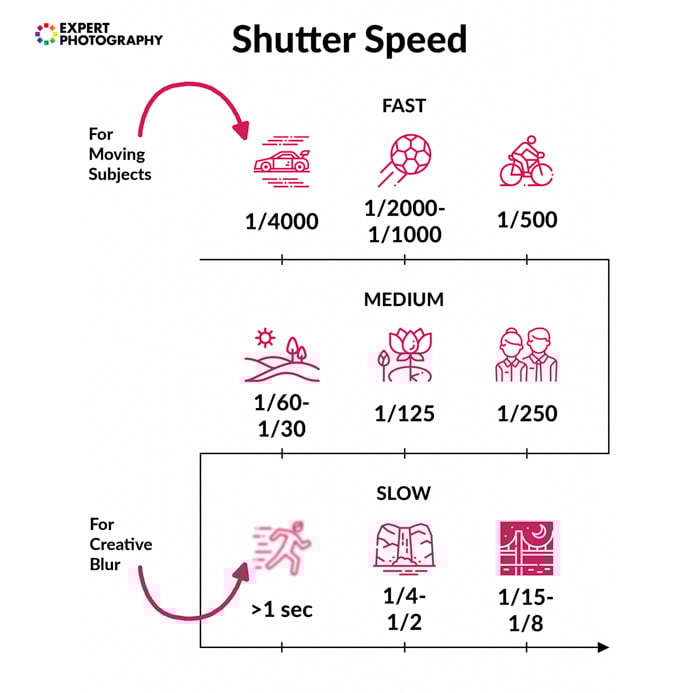
The speed you need also depends on how the subject moves through the frame. Movement across your view generally needs a faster shutter than the same movement toward you. A nearby subject can cross more of the image during the exposure than a distant one. A longer lens magnifies the subject and can make both movement and camera shake more visible.
Decide which part needs to be sharp. A dancer's face might look sharp while their hands blur. A hummingbird's body might be clear while its wings show motion. Increase the speed if those moving parts are important to the photograph.

When Should You Use a Fast Shutter Speed?
Use a fast shutter when you want to record a brief moment with little motion blur. Common uses include sports photography, wildlife photography, and movement in street photography.
It also helps reduce camera shake when you shoot handheld. A familiar starting rule for a stationary subject is a shutter speed around 1 divided by the lens's focal length: roughly 1/200 s with a 200mm lens on a full-frame camera. This is a guide, not a sharpness guarantee. Camera format, how steadily you hold it, stabilization, and how closely you inspect the result affect the usable speed.
Image stabilization reduces the effect of camera movement. It does not stop a moving subject. A tripod can steady your camera for a slow exposure, but it will not freeze someone running through the frame.
Fast shutter speeds can also help avoid overexposed images in bright light, especially with a wide aperture. They are not always necessary: a smaller aperture or lower ISO may let you use a slower speed. For a still subject in low light, a longer exposure with camera support may be more useful.
Choose a slow shutter speed when you want to show movement instead. A blurred wing, flowing water, or a panned background can be a deliberate part of the image.

How to Set a Fast Shutter Speed
Choose a starting speed, check the exposure, and take a test photograph. You can do this in shutter priority or manual mode; burst shooting is a separate setting.
Use Shutter Priority for Quick Adjustments
Shutter Priority Mode is usually marked S or Tv. You set the shutter speed and the camera selects an aperture for the metered exposure. You can choose the ISO yourself or use Auto ISO if your camera supports it.
This is useful when movement matters most and you need to change camera settings quickly. But the camera cannot always compensate for a very short exposure. If the lens is already at its widest aperture and the ISO cannot rise further, the photo may be too dark. Look for the exposure warning described in your camera manual.
Use Manual Mode to Control Aperture as Well
In manual mode, you choose both shutter speed and aperture. Set ISO yourself for fully manual exposure, or use Auto ISO on a compatible camera to let it adjust image brightness as the light changes.
Changing from 1/500 s to 1/1000 s halves the exposure time. With the same light and aperture, that lets in half as much light—one stop less. You can compensate with a one-stop wider aperture, such as f/4 to f/2.8, or by doubling ISO, such as ISO 400 to 800.
A wider aperture reduces depth of field. Higher ISO can make noise more visible, especially when light is limited. Choose the speed you need for the motion rather than automatically selecting the fastest setting available.
Keep Focus and Burst Rate Separate from Shutter Speed
A fast shutter cannot correct missed focus. For a moving subject, try continuous autofocus—often called AF-C or Servo AF—and keep the focus area on the part you want sharp.
Burst Mode takes several photographs in succession and helps you catch the decisive moment. Its frame rate tells you how many images the camera takes each second; shutter speed tells you how long each image is exposed. A fast burst can still produce blurred pictures if the shutter speed is too slow.
Check both motion and focus in a test burst. If the subject has a directional smear, try a shorter exposure. If another part of the scene is sharp instead of your subject, check focus placement and tracking.

Check Flash and Electronic-Shutter Limits
With a conventional focal-plane shutter and ordinary flash, stay within the camera's flash sync limit. A faster setting can leave part of the frame dark, or the camera may limit the speed. Compatible high-speed sync equipment permits faster settings, but reduces effective flash range. Check the camera, flash, and trigger manuals together.
Flash also needs time to recharge, so do not assume it can light every frame in a fast burst. For controlled splash photography where ambient light contributes little to the exposure, a short flash duration can freeze the action even with a slower shutter setting. That is a different technique from using a fast shutter in available light.
On cameras with a rolling electronic shutter, fast movement can look bent or stretched even at a short exposure. Flickering artificial lights can also cause bands. If you see these problems, test another supported shutter mode and check your camera's guidance; a faster shutter speed alone may not solve them.
Conclusion
A fast shutter speed helps you capture motion clearly, but the best value depends on the subject, distance, framing, and light. Start with a suitable speed, check a test shot, then adjust the exposure and focus as needed.
For a simple practice exercise, photograph the same moving subject at 1/250, 1/500, and 1/1000 s. Keep the framing similar and compare which details remain sharp. Use the result to choose your next setting, whether you want to freeze the action or leave some movement visible.