Cameras are complicated, but photography for beginners doesn’t have to be. Start with light, focus, and composition. Then learn how aperture, shutter speed, and ISO change your photos.
When I started shooting, I was frustrated with my first DSLR camera. I couldn’t capture what I saw through my viewfinder. Learning what each setting did helped me work out why a photo failed and what to change next.
This guide explains those digital photography basics with diagrams and photo examples. You can start with the camera you have. Try the exercise below, then use the later sections to understand the results.
- Learn to effortlessly set up your camera for any situation.
- Master the art of selecting the perfect exposure every time.
- Discover 10 composition rules that elevate your photos instantly.
Photography for Beginners (5 Photography Basics)
For your first practice session, choose a still subject near a window or outdoors in open shade. Keep the background simple. If you have a camera with aperture controls, try this:
- Select Aperture Priority (A or Av) and Auto ISO. Start at f/5.6, if your lens allows it.
- Put the focus point on your subject. For a portrait, focus on the nearer eye.
- Take a photo. Check whether the subject is sharp and whether important bright areas still show detail.
- Try a lower f-number, then a higher one. Compare how much of the background looks sharp. Watch the shutter speed: a longer exposure can introduce blur.
- Move to a different angle and take another photo. Notice how the light and background change even when the settings stay the same.
A phone or automatic compact camera is enough to practice light and framing. Tap your subject to focus if your camera supports it. The aperture exercise needs a lens with an adjustable aperture.
We’ll go over camera, lens, and composition basics below. Plus, we’ll look at some photography terms and suggest some equipment to get you started. Use these five sections to find the next lesson:
- Learn How Cameras Work
- Find a Camera
- Understand Your Camera
- Understand Your Lens
- Learn Composition and How to Take Sharp Photos
How Do Cameras Work?
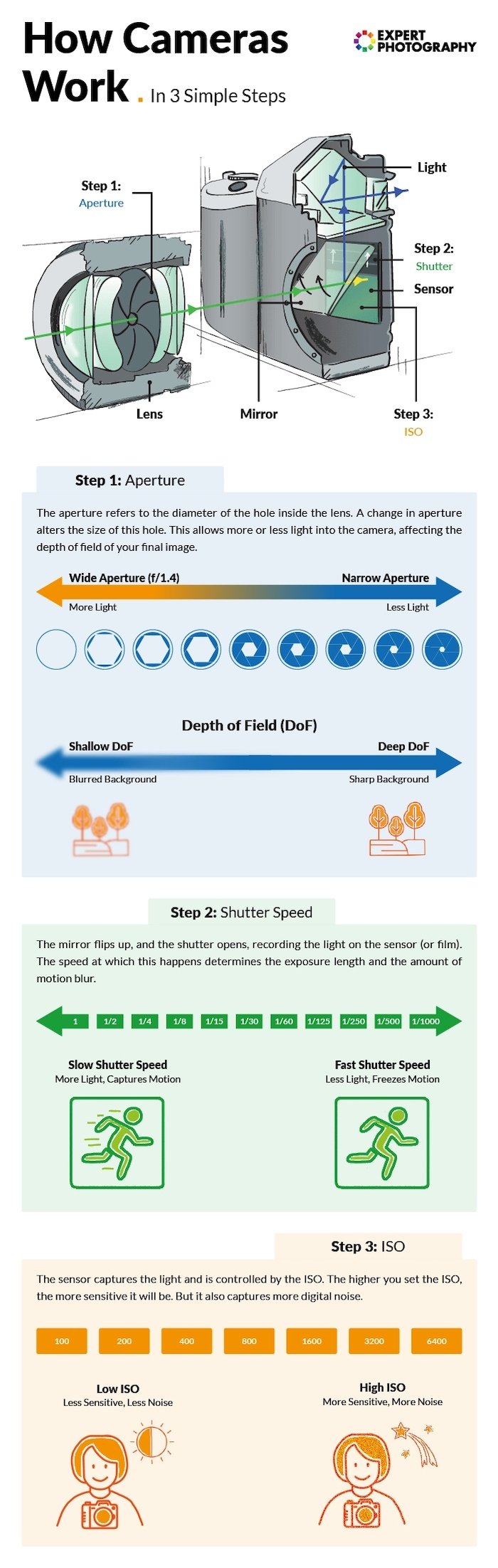
A digital camera focuses light through a lens onto a sensor. The sensor records the light, and the camera processes that information into an image. The diagram below shows how the main parts work together.
To make this easier to picture, I created an infographic.
I collaborated with an illustrator friend, and together we made these images. The following will make understanding exposure and how cameras work much easier!
Check out what we came up with below.
Exposure
Understanding exposure is the key to capturing a great image.
Learning how exposure works will help you take control of your camera and take better photos. Aperture and shutter speed control how much light reaches the sensor. ISO affects how bright the recorded image appears. These three settings work together, but each has a different job.
The exposure triangle is a way to remember the three settings and how they relate to each other. Opening the aperture or using a longer shutter speed collects more light. Raising ISO does not collect more light by itself.
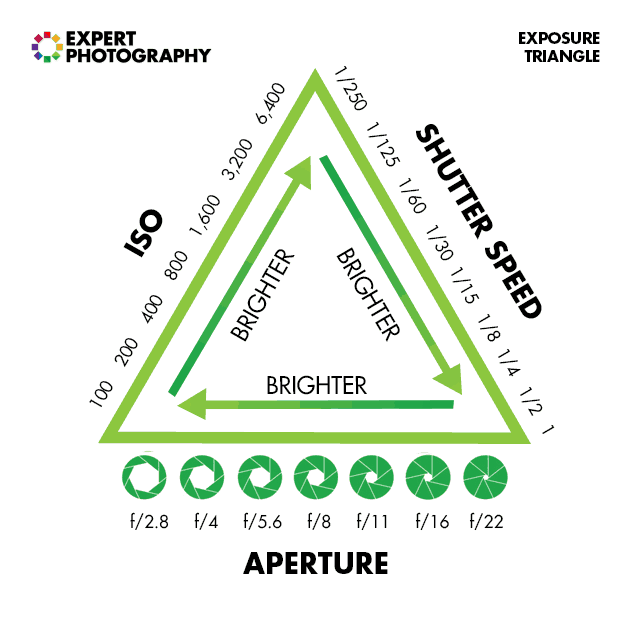
To keep a similar image brightness in the same light, balance a change in one setting with a change in another. For example, at the same ISO, changing from 1/125 s to 1/250 s halves the light collected. Opening the aperture from f/5.6 to f/4 roughly doubles it again.
As you’ll soon learn, these elements affect more than exposure. They also cause alterations in depth of field, motion blur, and digital noise.
You don’t need Manual mode to learn this. Aperture Priority and Shutter Priority let you choose one setting while the camera helps with another. First, let’s look at what each setting changes.
1. Aperture
The first element of the exposure triangle we’ll look at is aperture. This is the hole inside the lens that allows light to pass through to the camera’s sensor.
It’s similar to the pupil of your eye. The wider the aperture, the more light is allowed into the camera. If you make the aperture smaller, it lets less light in.
We measure the size of the aperture in a scale of f-stops and each f-stop denotes the size of the aperture. The confusing thing is that smaller apertures have larger f-stop numbers, and bigger apertures have smaller numbers.
For example, an f/22 aperture is narrow and lets in less light than f/1.8. You can use a wide aperture in bright light or a narrow one in low light by balancing shutter speed and ISO. Choose the aperture for the depth of field you want, then check the exposure.
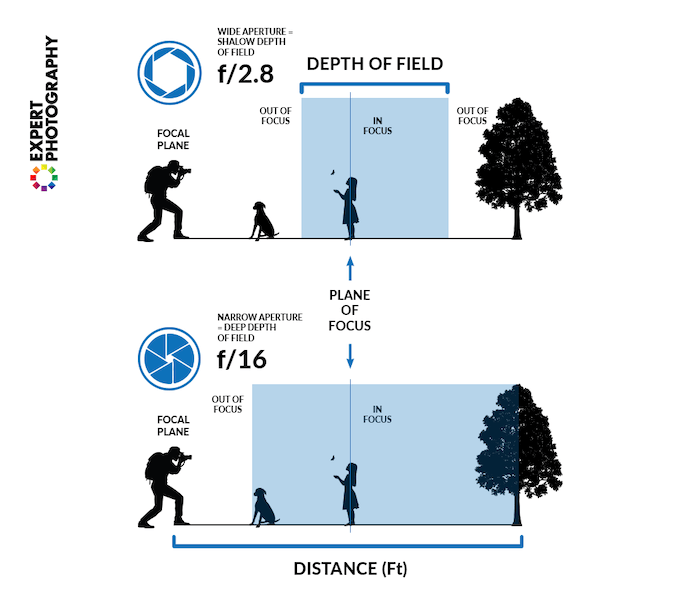
But aperture doesn’t only affect the amount of light that passes through. It also has a big effect on focus and depth of field.
Depth of field is the range of distances that looks acceptably sharp. With a shallow depth of field, only a small part of the scene looks sharp. This can help a subject stand out against a blurred foreground or background.
A deep depth of field keeps a wider range of distances looking sharp. It does not guarantee that every part of a scene will be sharp. Focus distance and the distance to your subject also matter.
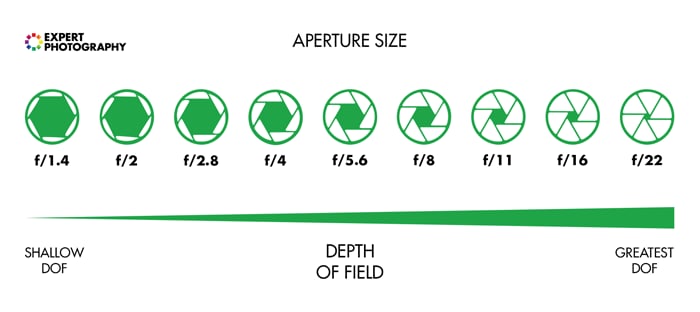
Using a narrower aperture with a higher f-number helps create a deep depth of field when the other conditions stay the same. This can suit a landscape with foreground detail. A wider aperture reduces depth of field and can help blur the background in a portrait.
A common full-stop scale is f/1.4, f/2, f/2.8, f/4, f/5.6, f/8, f/11, f/16, f/22. Each step toward a higher number roughly halves the light passing through. Your camera may also offer smaller steps between these values. You can learn the pattern as you practice.
2. Shutter Speed
The next exposure setting we need to look at is shutter speed.
Shutter speed is the length of time used to record an exposure. In a camera with a mechanical shutter, the shutter opens and closes to control that time. An electronic shutter controls exposure through the sensor’s electronic operation.
A short exposure, such as 1/250 s, can reduce blur from camera shake or a moving subject. The speed you need depends on subject movement, focal length, and how steadily you hold the camera. That’s why different shutter speeds suit different situations.
For example, you might use 1/4000 s for fast action in sports photography, or a 30-second exposure with a tripod to record a night scene. These are examples, not the limits of every camera.
It all depends on what you’re shooting and how much light you have available. That’s why knowing how your shutter speed works is key to understanding photography basics.
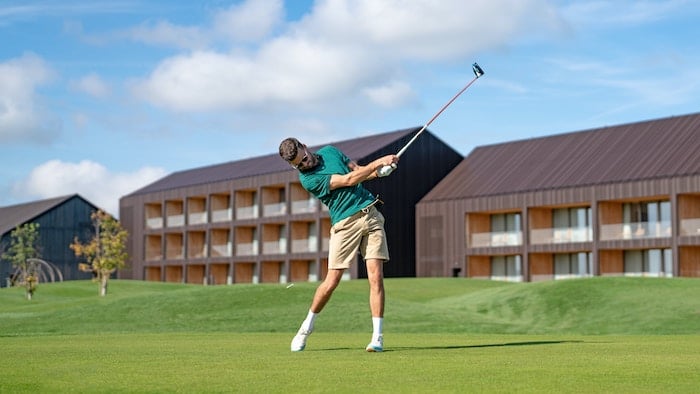
A freeze-frame shot with a Sony a7R III. 50mm, f/1.6, 1/4000 s, ISO 100. © Frederik Rosar (Unsplash)
3. ISO
ISO affects how bright the camera makes the image from the light recorded by the sensor. With aperture and shutter speed fixed, a higher ISO produces a brighter image. It does not make the lens or shutter collect more light.
Higher ISO settings let you use a faster shutter speed or a narrower aperture while keeping a similar brightness. That can help in low light or when your subject moves. High-ISO photos often show more digital noise, especially when little light was captured.
Use a low ISO when the light and your chosen settings allow it. Raise it when a slower shutter speed would blur the subject. A sharp photo with some noise is often more useful than a clean-looking photo spoiled by movement.
Auto ISO can help while you learn. Keep an eye on the shutter speed and check the result instead of treating one ISO number as a rule for every scene.
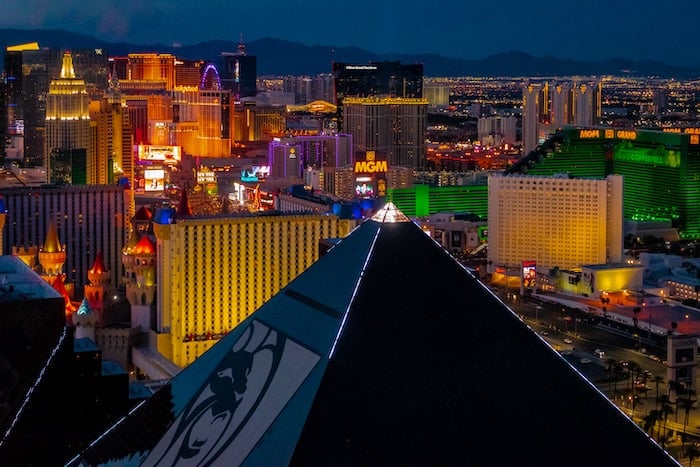
High-ISO image shot with a Nikon D3300. 42mm, f/4.8, 1/60 s, ISO 3,200. © Tom Podmore (Unsplash)
Exposure Summary
Once you have a basic grasp of aperture, shutter speed, and ISO, you need to learn how each element of exposure works together. Read about it in our article on the exposure triangle.
Choose your priority before changing settings. For a moving subject, protect the shutter speed. For a blurred background, choose the aperture. Then adjust the remaining settings for the light. You can practice composition at the same time; you don’t need to master exposure first.
So, learn the “stop-based” system for measuring exposure and master aperture, shutter speed, and ISO to take complete control of your camera.
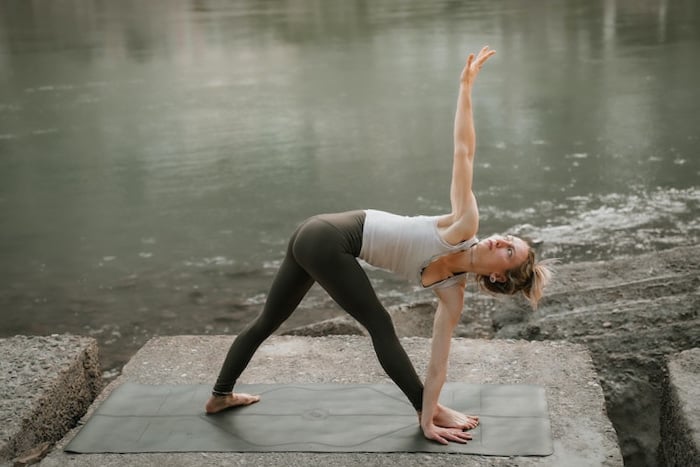
Triangle yoga pose. Shot with a Sony a7 IV. 52mm, f/2.8, 1/250 s, ISO 160. © Gokul Gurung (Unsplash)
Finding a Camera for Digital Photography
Now we’ll look at how to find a camera that suits you. We’ll look at camera types and the different features you should look for. Plus, we’ll take a look at the top camera brands.
Finding the Best Camera
Before buying a camera, decide what your current one prevents you from doing. You might need more control over shutter speed, a longer lens, or a camera that is easier to carry. A higher specification alone won’t tell you which one suits you.
Finding the best camera is about finding one that helps you achieve your photography goals. You might want to learn some camera basics and explore the art form.
Or you might be looking for a camera for a particular type of photography. Thankfully, there are plenty of cameras for everyone, from portrait photographers to vloggers.
If you’re new to photography, you can check out our list of the best cameras for beginners. We also review the best Canon cameras for beginners.
We also have a guide to the best streaming cameras.
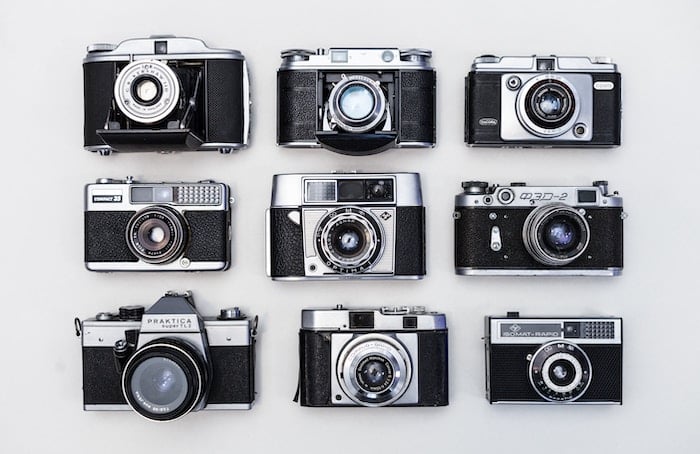
Dan Cristian Pădureț (Unsplash)
DSLR vs Mirrorless
Two common interchangeable-lens camera types are the more traditional DSLR models and newer mirrorless cameras. Both let you change lenses and control exposure.
You can look at the full comparison in our DSLR vs mirrorless article. A DSLR uses a mirror to direct light from the lens into an optical viewfinder. The mirror moves out of the way when you take a photo.
A mirrorless camera has no reflex mirror. You compose using the rear screen or an electronic viewfinder, if the camera has one. Mirrorless does not mean shutterless: a model may use a mechanical shutter, an electronic shutter, or both.
If you already have a working DSLR, you can learn all the basics in this guide with it. You don’t need to change systems to improve your photos.
Our article on whether DSLRs are on the way out looks at the system question in more detail. If you are buying a used DSLR, check its condition and the lenses you will need before choosing it.
Removing the mirror gives designers room to make smaller bodies, though the weight of the camera and lens together still matters. An electronic preview can also help you see changes in brightness and color before you shoot.
Autofocus, burst speed, video, and battery life vary by model. Compare the features you will use rather than choosing by camera type alone. Our guide to the best mirrorless cameras is a starting point for comparing options.
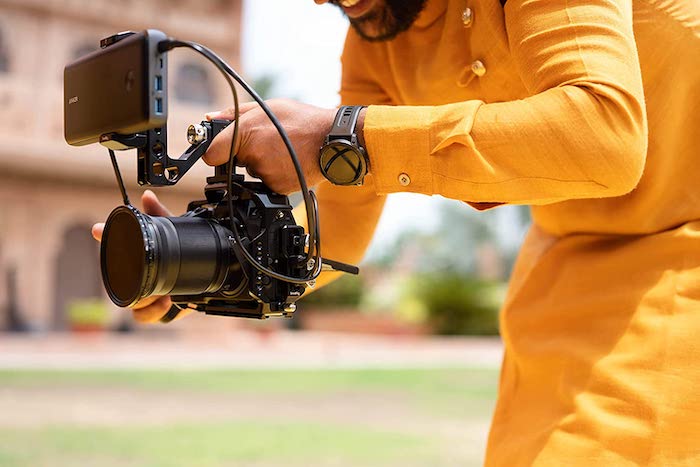
A Nikon Z8 mirrorless camera recording with an external screen attached
What Sensor Size Do You Need?
Digital cameras use several sensor sizes, including Micro Four Thirds, APS-C, full frame, and medium format. Sensor format and the number of megapixels are different specifications.
A smaller format can make a compact camera-and-lens kit possible. It doesn’t mean the camera is only for beginners. Equally, a larger sensor doesn’t automatically mean a higher-resolution image.
Full-frame cameras use a larger sensor than APS-C cameras. When comparing image quality, look at low-light performance and dynamic range, which is the range from dark to bright tones a camera can record. Judge the particular model rather than the format alone.
Sensor size is one factor in choosing a professional camera, alongside lenses, handling, autofocus, and the work it needs to do. It is not a qualification you need before you can take good photos.
For a first camera, weigh the whole kit’s cost and weight against what you want to photograph. Our APS-C vs full-frame article compares those two formats.
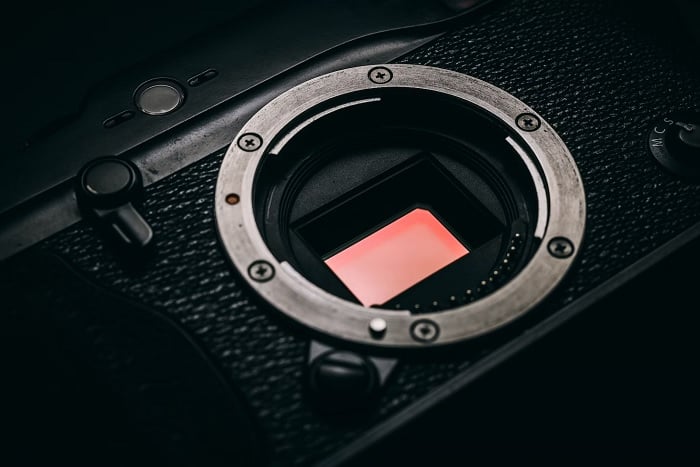
Close-up of a digital camera sensor
Other Types of Cameras
There are many other camera types if you don’t fancy a DSLR or mirrorless. There are compact cameras (or point-and-shoot cameras). There are even full-frame compacts. You also have action cameras like GoPros and similar alternatives.
A compact camera gives you a fixed lens in one body. An action camera is built around a different task, such as recording from a mounted position. Look at the controls and lens coverage you need.
Some compacts have zoom lenses; others use a fixed focal length. Check which you are buying, because you cannot swap that lens for another.
Compact cameras are also excellent for casual photography. They are great for holidays and family events. Read our recommendations for the best compact cameras.
You also need to know about Micro Four Thirds cameras. These use an interchangeable-lens system with a sensor smaller than APS-C or full frame. Compare complete kits rather than assuming every body will be smaller.
Features for photography and video vary by model. Check our recommendations for the best Micro Four Thirds cameras if this format interests you.
Medium format uses a sensor larger than full frame. It is another option for work that calls for it, rather than a necessary step in learning photography.
The sensor format alone does not tell you the camera’s autofocus performance, video features, or how easy it will be to use. Those need a model-by-model comparison.
Read our full article on medium-format vs full-frame cameras for a comparison of the two formats.
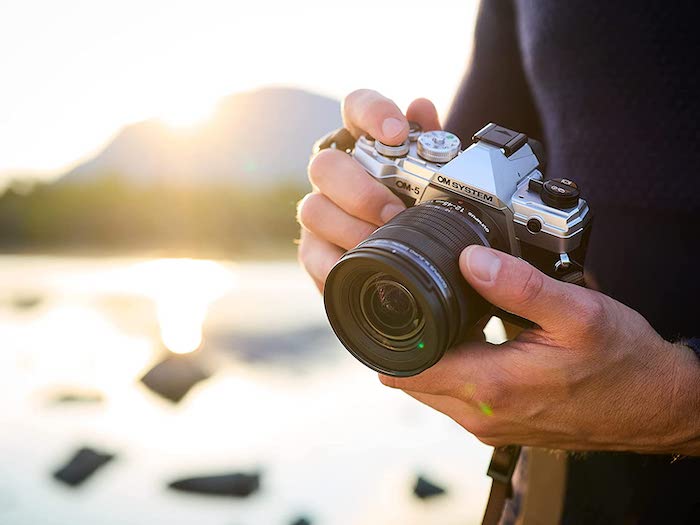
OM System (Olympus) OM-5 Micro Four Thirds camera
Crop Factor
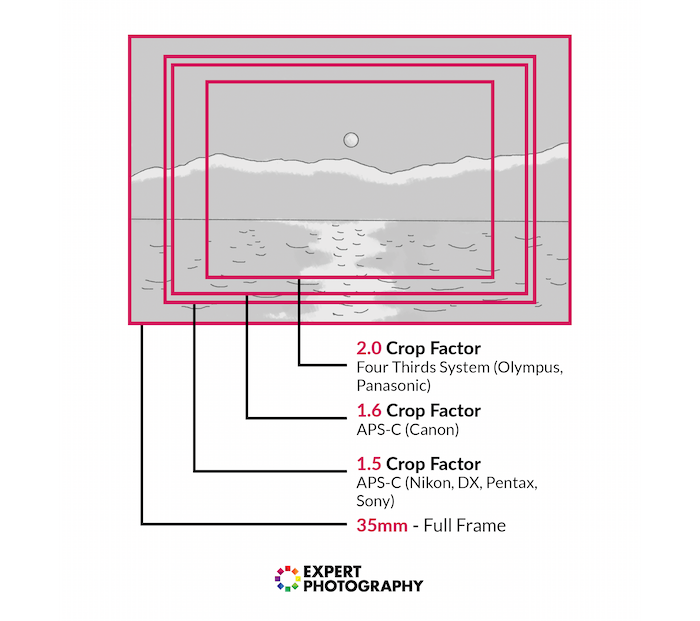
You have to be aware of crop factor when comparing lenses across different sensor formats.
A smaller sensor records a smaller part of the image projected by a lens. From the same position, the same focal length therefore gives a narrower field of view than it does on a larger sensor.
The lens’s actual focal length does not change. Multiply it by the crop factor to compare the field of view with full frame. For example, a 50mm lens on a 1.5× crop camera gives a field of view similar to a 75mm lens on full frame. This is an equivalent focal length, not an extra optical zoom.
Which Is the Best Camera Brand?
There isn’t one camera brand that suits everyone. Compare the cameras you can afford, the lenses they accept, and how the controls feel in your hands.
You can read our full article on all the best camera brands for an overview. If you already own lenses, check compatibility before switching systems. A brand name alone does not guarantee that a lens fits a body.
Nikon and Canon are a common comparison. Make that choice between particular systems and models, including the lenses you will use.
If you know Sony is a mirrorless specialist, that can narrow your research, but it does not decide which model is right for you. Apply the same practical checks to Fujifilm, OM System, Panasonic Lumix, Leica, and other brands.
For your first camera, prioritize controls you can learn, a suitable lens, and a kit you will carry. You can learn exposure and composition with many different systems.
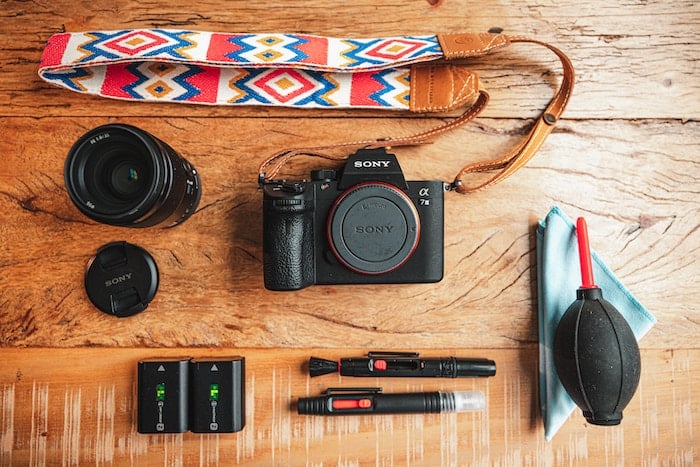
Sony a7 III camera body, lens, and accessories
Understanding Your Camera
Now, we’ll look at the cameras in more detail. This section breaks down some technical information. And it will help you understand some of the basic features found on digital cameras.
Why Are Megapixels Important?
A megapixel (MP) is one million pixels. A camera’s megapixel count describes the pixel dimensions of its images, not a score for how good every photo will look.
More pixels can provide more room to crop or make a large print. But focus, lens performance, camera shake, noise, and light still affect how much detail you capture. More megapixels cannot make up for missed focus.
Read more about this in our article about resolution and megapixels. When choosing a camera, think about how you will use the photos instead of comparing only the biggest number.
Metering Modes
Digital photography for beginners can be confusing. Exposure isn’t as simple as learning about aperture, shutter speed, and ISO.
Metering modes control which parts of a scene the camera uses to judge brightness and suggest an exposure. Matrix, Evaluative, or Multi metering considers the wider scene; spot metering measures a small area. The names and details vary by camera.
Spot Metering mode can help when you want to meter from a particular subject. It requires care: a reading from bright snow and a reading from a dark coat can give very different suggestions. Start with the wider-scene metering mode while you learn.
This is also covered in our Photography Unlocked eBook. The metering modes article linked above explains how and when to use them.
This camera feature helps explain why your photos come out underexposed or overexposed. In an automatic or priority exposure mode, try exposure compensation if the camera’s result is too dark or too bright. Positive compensation asks for a brighter result; negative compensation asks for a darker one. Check again after each change.
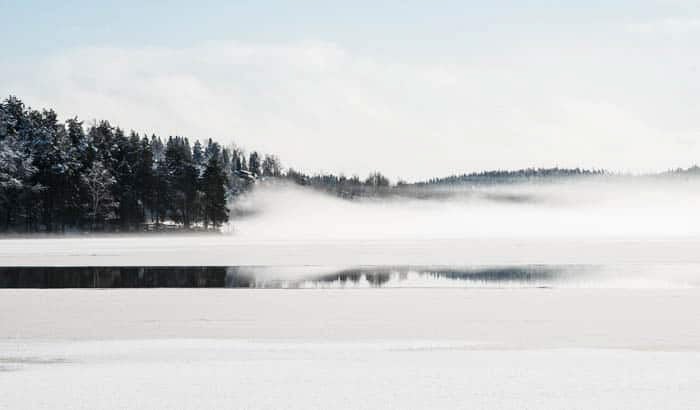
Shot with a Nikon D800E DSLR camera. 180mm, f/14, 1/250 s, ISO 250. Anders Nord (Unsplash)
Histograms
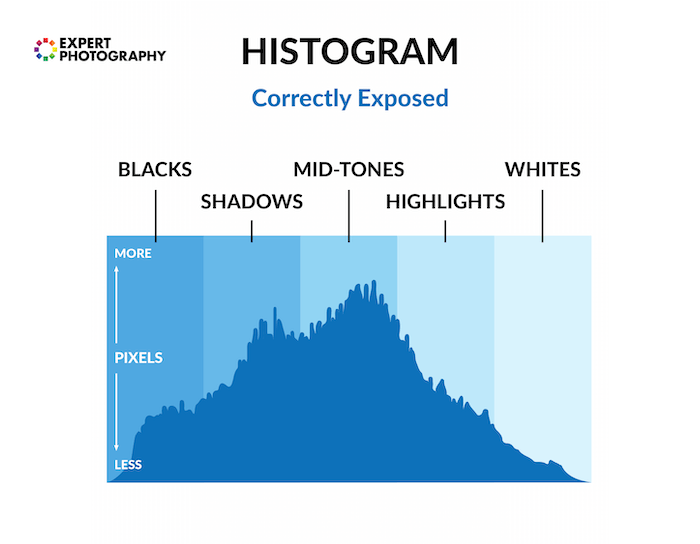
A histogram shows the distribution of tones in an image: dark tones on the left and bright tones on the right. It helps you judge exposure when the screen alone is hard to read.
There is no single correct shape. A snowy scene and a night scene should not have the same tonal distribution. Look for lost detail in important highlights or shadows, as explained in our histogram article.
LCD screens aren’t very good at showing you this information through their image display. This is because they are affected by the ambient lighting conditions you’re in and the screen’s brightness.
Use the histogram with the photo and, if your camera offers it, the highlight warning. A bright reflection may clip without spoiling a photo, while lost detail in a face can matter much more.
Shooting Modes
Choose a shooting mode according to what you want to control:
- Auto: the camera handles most settings. Use it to concentrate on light and framing.
- Program: the camera selects aperture and shutter speed while giving you access to other settings.
- Aperture Priority: you choose the aperture, and the camera selects shutter speed. Start here to explore depth of field.
- Shutter Speed Priority: you choose shutter speed, and the camera selects aperture. Use it to explore freezing or blurring movement.
- Manual mode: you choose aperture and shutter speed. Set ISO yourself or use Auto ISO if your camera supports it.
The camera can only work within its limits. In Aperture Priority, watch for a shutter speed too slow to hold steady. In Shutter Priority, watch for an exposure warning when the lens cannot open far enough.
There are also a lot of misconceptions about which mode to use under which conditions. Learn more by reading our full article on shooting modes.
A priority mode is a practical learning tool; Manual is useful when you want to keep settings under your control. This is also covered in our Photography Unlocked eBook.
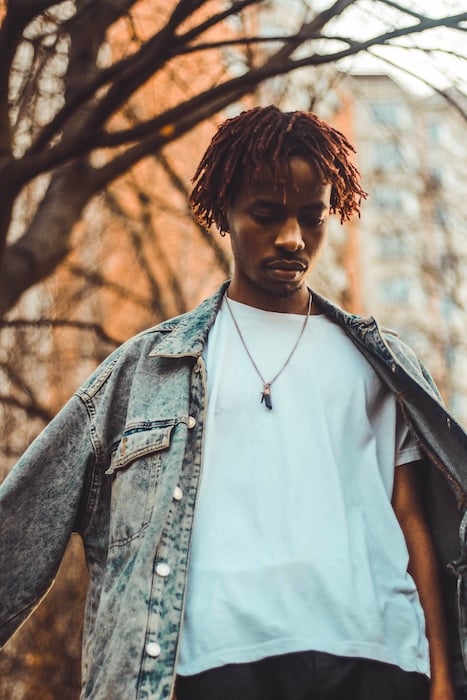
Shot with a Canon 60D. © Ahmed Adel (Unsplash)
Depth of Field
Depth of field is the range of distances that looks sharp around your focus point. Aperture is one control; focal length and how close you are to the subject also affect the result.
When shooting in low light, opening the aperture lets in more light, but can give you a shallow depth of field. You can also use a longer shutter speed for a still subject with support, add light, or raise ISO. Choose according to whether the subject can stay still.
You can creatively use this. But it’s not the only possibility.
You may want a narrower aperture for a landscape with foreground and background detail. Choose the focus point with care too. A high f-number alone cannot guarantee that the whole scene is sharp.
Our tutorial on depth of field walks you through everything you need to know. It’s about choosing the right aperture (and the depth of field) for the right situation.
When covering all the basics of photography, depth of field is very important.
White Balance
White balance is something I wish I’d learned more about much sooner than I did. I look back on some photos now and wonder what I was thinking.
The white balance changes the color cast of the entire photo. It’s responsible for overall warmth. It can determine whether your photo appears blue or orange, cold or warm.
Auto White Balance (AWB) is a starting point. If indoor tungsten light makes a photo look too orange, try the matching white-balance preset and compare. Mixed window light and indoor lamps can be harder to correct with one setting.
This is also covered in our Photography Unlocked eBook.
Understanding Your Lens
In many ways, your lens is just as important as your camera. Knowing how your lens works gives you more creative control.
And specific lenses are better for certain types of photography. Knowing this allows you to choose a lens that suits your style.
Focal Length
Have you ever wondered what the “mm” on your lens means? Or do you wonder why people use longer focal lengths for portraits?
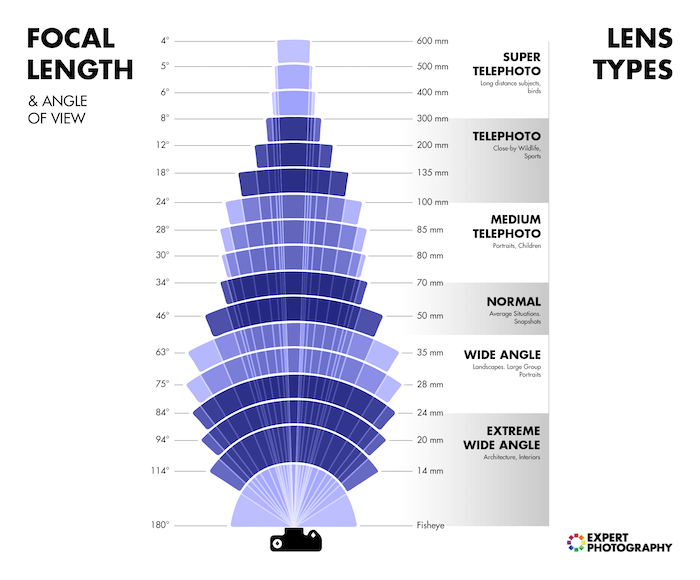
Focal length helps determine the lens’s angle of view and magnification. A 50mm lens gives a standard field of view on full frame, but a narrower one on a smaller sensor. Always consider focal length and sensor size together.
A small focal length, like 16mm, gives you a wide viewing angle. And a focal length like 300mm gives you a high level of magnification.
If you want to know more, it’s all discussed in our post on focal length. Changing focal length changes framing from the same position. Moving the camera changes perspective: the apparent size relationship between near and far objects.
We cover which focal length you want to use in different situations and their possible side effects. It’s a worthy read and one of my favorite tutorials.
Prime vs Zoom Lenses
Zoom and prime lenses are both popular with photographers. But both types of lenses have their strengths and weaknesses. Deciding between the two is about deciding what suits your photography.
A prime lens has a fixed focal length. The field of view can’t be changed, meaning you can’t zoom in or out. That’s the downside of a prime lens.
A prime can be compact and offer a wide maximum aperture. The benefits depend on the particular lens; a prime is not automatically sharper or lighter than every zoom.
Zoom lenses, with their variable focal lengths, are more versatile. You have more shot variety when shooting.
They let you frame a distant subject more tightly without moving. Compare size, weight, aperture, and sharpness for the lenses you are considering. A zoom does not automatically mean poor image quality.
You can read our full article on prime vs zoom lenses.
The Nifty Fifty
What can I say about the nifty fifty? What’s not to love?
I’m referring to a 50mm f/1.8 prime lens when I talk about the nifty fifty. It can be a way to explore a wide aperture, but check the exact lens mount and compatibility with your camera.
It’s a great introduction to buying better-quality lenses. And it’s an excellent way of getting to grips with what aperture is.
The linked guide explains this type of lens. Before making it your first upgrade, try the 50mm setting on a zoom if you have one. On an APS-C camera, its tighter field of view may suit portraits better than a small room.
Choose it when that field of view and maximum aperture solve a problem you have noticed in your own photos.
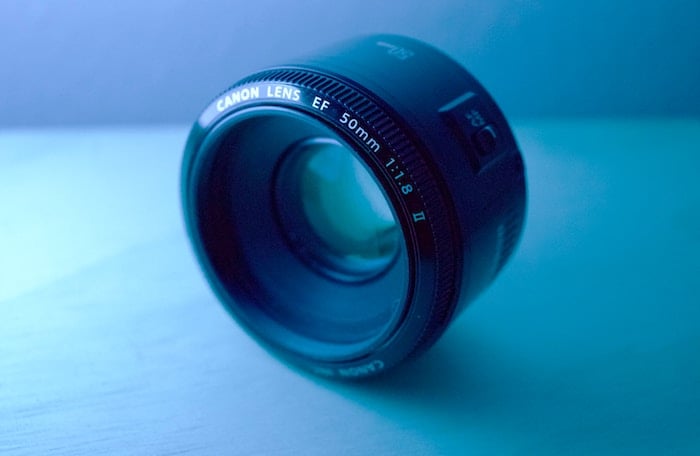
The discontinued Canon EF 50mm f/1.8 II was replaced by the Canon EF 50mm f/1.8 STM lens
What Lens Is Best for Beginners?
Finding the best lens can transform your photography. But, like cameras, choosing the best lens depends on the photography you want to shoot. Developing a basic understanding of lenses helps you find the one that suits your needs.
Certain lenses favor different types of photography. And picking one that suits you will help you succeed in that discipline.
For street and travel photography, a moderate wide-angle or standard field of view can let you include a subject and its surroundings. A 35mm or 50mm lens gives different framing on full frame and APS-C, so check the view on your own camera.
Real estate and architecture photographers need wide-angle lenses. The broad field of view helps them capture expansive exteriors and tight interiors.
The same can be said for landscape photographers. They also like wide angles for capturing large open areas.
You can use 50mm lenses for portrait photography. But larger focal lengths give you tighter, more intimate compositions.
Longer lenses can also suit product and food photography when you have room to work. For small details, check how close the lens can focus as well as its focal length.
A fast maximum aperture is also beneficial in a portrait or product lens. It gives you excellent exposure control. And you can achieve a shallow depth of field and a smooth bokeh effect.
Sports and wildlife photographers use super-telephoto lenses. They give you excellent magnification. So, if you’re up in the stands or riding in a safari vehicle, you can get a close-up shot!
You can see the best lenses for each discipline in our guide to the best lenses for every type of photography. We also have these guides:
- Best lenses for real estate photography
- Best lenses for sports photography
- Best lenses for wildlife photography

© Sven Mieke (Unsplash)
Lens Filters
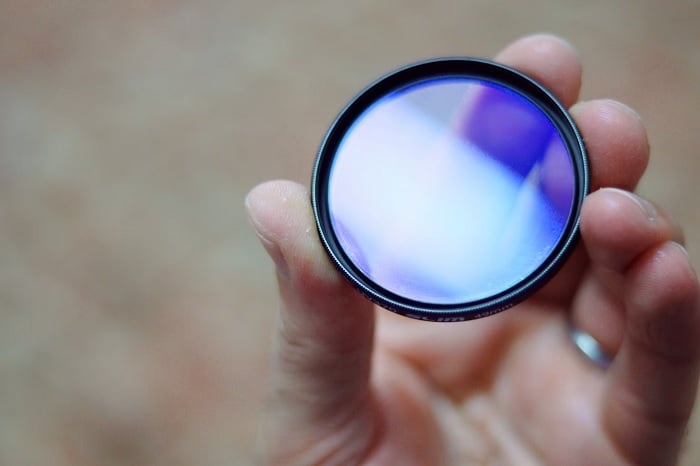
Camera lens filters are a great tool for modifying or enhancing your photography work. They’re practical camera accessories that sit in front of your lens. And they can make a huge difference to the way you work.
There are two different types of glass filters. One screws onto the end of your lens and the other is mounted in front of the lens.
A protective or UV filter adds a layer in front of the lens’s glass, but it is an optional accessory rather than a first lesson you need to buy. Choose a filter when you know what task it will serve.
Other filters block or change light as it passes through into the lens and camera. Different filters change the light in different ways. Read more about how each one can help you take better pictures or certain types of photography:
- Polarizing filters, also called polarizers or CPL filters
- Neutral density filters or ND filters
- Graduated ND filters
- Variable ND filters
- Light pollution filters
- Infrared filters
- Astrophotography filters
Composition and Taking Sharp Photographs
It’s important to understand exposure. But you’ll struggle to take really good photos if you can’t understand basic composition.
I’m not saying that you have to follow every compositional rule. But it helps to learn these rules so they can help guide you in taking better photos.
We’ll also look at snapping sharp images. Blur can be deliberate too; you can even add cool motion blur during editing. First, learn to tell intentional blur from a missed focus point or a shutter speed that was too slow.
Rule of Thirds
The rule of thirds is often the first compositional rule that any beginner photographer comes across. And that’s for an excellent reason—it’s simple and works.
Imagine two vertical and two horizontal lines dividing the frame into nine equal rectangles. Try placing your subject near a line or intersection, or placing a horizon along a horizontal line.
Use it as a starting point. A centered subject or a symmetrical composition can work just as well. Take one centered version and one off-center version, then compare where your attention goes.
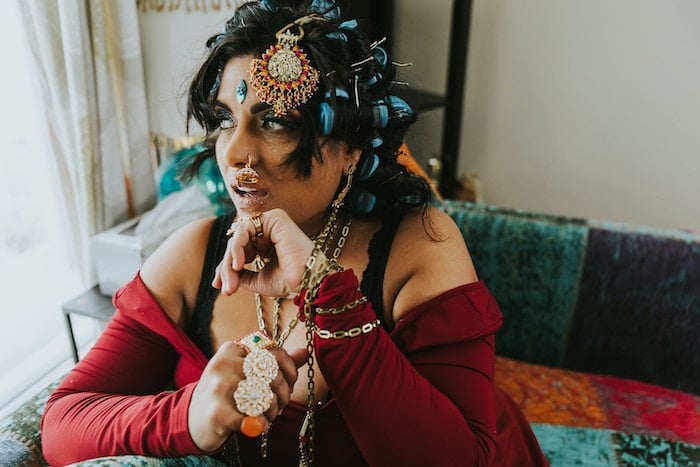
Shot with a Canon EOS 5D Mark IV. 31mm, f/2.8, 1/50 s, ISO 800. © Nate Dale (Unsplash)
Visual Weight
Visual weight differs from size or weight as we know it. It’s all about what we’re drawn to when we look at a photo.
You’ll understand how people look at photos when you understand visual weight. You’ll learn to position certain elements in a frame to direct the viewer’s attention to where you want them to look.
It’s not so much a tool or a rule. It’s an understanding.
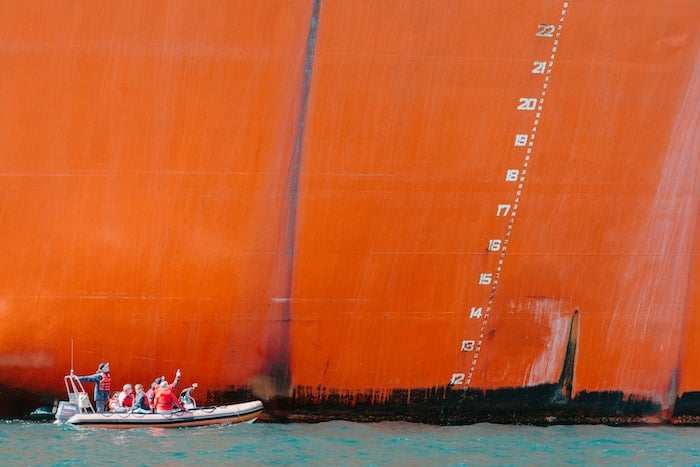
Shot with a Nikon D7100. 62mm, f/3.5, 1/500 s, ISO 6400. © Gordon Plant (Unsplash)
Triangles
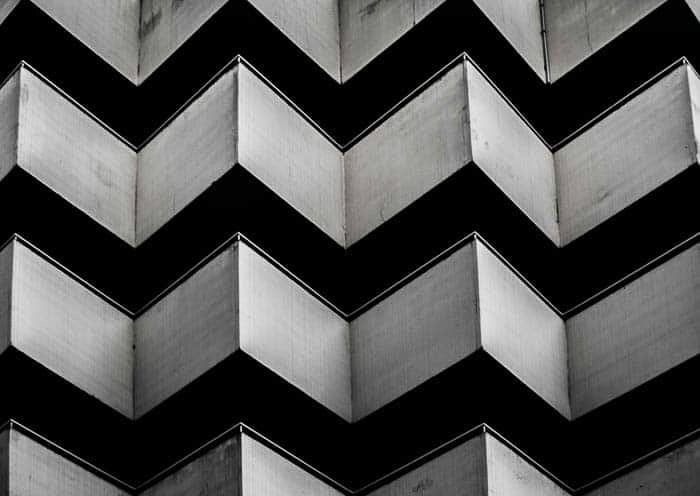
Shapes are essential in photography. Triangles are in almost everything we see in one way or another. It’s only a case of distinguishing and knowing what to do with them.
Triangles make great compositional tools. They’re easy to make and manipulate and are quite common. They are a great way to create the simplest and most basic photography compositions.
They are also perfect for combining different compositional photography techniques. These include lines and paths to create a more interesting part of a photo.
You can use them to make a photo look more stable or unstable.
Eye Lines
If you take photos of people, you’re taking photos with eye lines. Understanding how eye lines affect how we view a photo is important.
Eye lines are the direction in which your subject’s eyes are pointed. The negative space in front of the subject’s face is called “lead room.”
These can focus our attention on a particular part of the photo. They also produce tension and other photographic elements.
They’re not physical lines. But they can be used as such to draw attention to parts of a photo. Or they can even create a sense of mystery or curiosity about what is not in the frame.

Balance
Balance in a photo affects how we feel when we look at it. An unbalanced photo can make us feel uneasy. A balanced photo will make us feel more relaxed.
Whether you choose to make the photo balanced or unbalanced doesn’t matter. But it’s best to understand why you’ve chosen one or the other.
Both affect your photos in different ways. Again, it’s one of those situations where the more you know, the easier it will be to produce the desired effect.
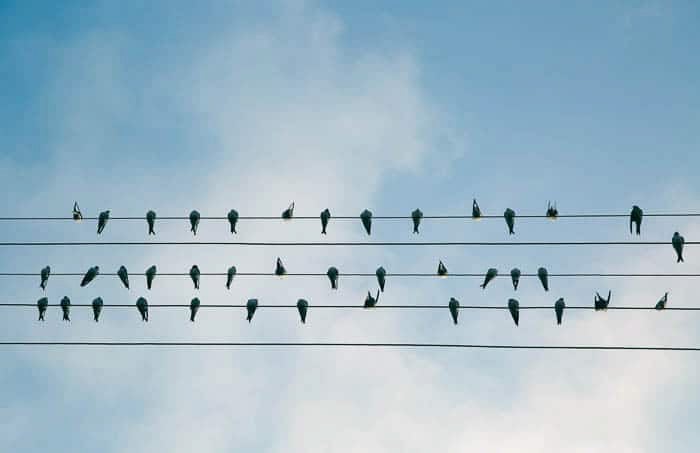
Take Sharp Images Like a Pro Photographer
Start by checking where you focused and what moved during the exposure. Those are separate problems.
- Choose the focus point. Place it over the part that matters, such as the nearer eye in a portrait. Check which object the camera actually selected.
- Match autofocus to movement. Single-shot autofocus suits a still subject. Continuous autofocus keeps adjusting for a moving one. Names and controls vary by camera, so check your model’s manual.
- Check shutter speed. If the whole picture is smeared, camera shake may be the cause. If the background is sharp but the subject is blurred, subject movement may be the problem. A faster shutter speed can help with both.
- Use support when appropriate. A tripod helps keep the camera still during a long exposure, but it cannot stop a person or animal moving.
- Review at a larger size. Enlarge the subject on playback. Check the focus and blur before leaving the scene.
In our guide to taking sharp photos, we walk you through these choices in more detail. It also covers using a tripod and shooting in RAW. RAW is a file-format choice; it does not correct missed focus or freeze movement.
JPEG is a practical starting point if you want a camera-processed image to share. RAW gives you more scope to choose processing later, including white balance, but needs a compatible editing workflow. You can learn focus and exposure with either format.
Conclusion: Photography for Beginners
Take one idea from this guide into your next practice session. Photograph the same subject with two apertures, try a faster shutter speed when something moves, or compare two camera positions. Check what changed and keep a note of the setting that helped.
Once the photo is sharp and the exposure works, try a simple edit: straighten the frame, crop distractions, and adjust brightness or white balance. Keep the original file so you can compare. Then use what you noticed to make the next photo more deliberate.
I encourage you to go and explore our tutorial archive. And you can check out our Photography Unlocked eBook for more camera basics. Or check out our Photography for Beginners course to master everything you need to know about taking photos!