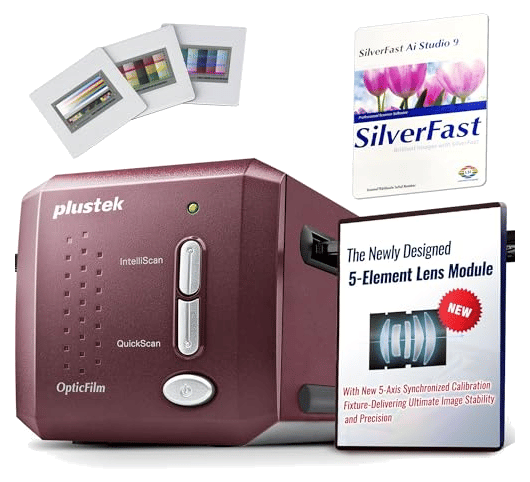
The Plustek OpticFilm 8300i SE is our top pick for most people with 35mm negatives and slides. It scans at a true optical 7,200 dpi, and its infrared channel finds dust and scratches on color film. SilverFast software gives you full control over each frame on your computer.
Start with the film you own. Most scanners here take only 35mm, and a 35mm holder will not take 120 medium-format negatives. The other picks cover color-calibrated archive work, medium format, whole-strip batch scanning and black-and-white film. For family photos you want to save without a computer, there are three simple standalone scanners with their own screens.
The Best Film Scanners for Negatives and Slides
Two questions sort this list. First, will you scan on a computer? The five computer scanners use a true optical resolution and scanning software, and they give the most detail and the most control. The three standalone models are quicker to learn and save JPEGs to an SD card, but their largest file settings are interpolated. Interpolation adds pixels without capturing extra detail from the film.
Second, does your film need infrared cleaning? An infrared channel maps dust and scratches on color negatives and slides so the software can remove them. It does not work on traditional silver black-and-white film, so a black-and-white shooter does not need to pay for it.
Film photography includes the work after shooting, too. If you're buying 35mm film and developing rolls regularly, home scanning lets you choose which frames to digitize. It also gives the film vs digital debate a practical middle ground: film capture followed by digital editing and sharing.



Film Scanner Reviews
The Plustek OpticFilm 8300i SE is our first choice for anyone who wants a dedicated 35mm scanner. It takes negative strips and mounted slides and scans them at 7,200 dpi with 48-bit color. A full 35mm frame at that setting comes out at about 69 megapixels.
The infrared channel is the main reason to choose it over the cheaper OpticFilm 8100. It records dust and scratches separately from the image, and SilverFast's iSRD tool removes them from color negatives and slides. That saves a lot of retouching on old or dusty film. Plustek bundles SilverFast SE Plus 9, with its NegaFix profiles for converting color negatives, and the simpler QuickScan Plus.
Plan your time. Plustek's scan timings list about 40 seconds for a 7,200 dpi scan and about 120 seconds with infrared. At 3,600 dpi, the times drop to 20 and 40 seconds. You also move the film holder by hand for each frame. That makes it best for choosing and scanning your best frames, not for running through a box of rolls unattended. If you have whole rolls to get through, the OpticFilm 135i scans a full holder in one pass.
It does not scan medium-format film or paper prints. For 120 negatives, look at the PrimeFilm 120 Pro Plus.
2. Plustek OpticFilm 9000i Ai
| Film Formats |
Film Formats
35mm negatives and mounted slides
|
| Resolution |
Resolution
7,200 dpi optical
|
| Dust Removal |
Dust Removal
Infrared channel
|
| Scanning Workflow |
Scanning Workflow
Computer, holder moved by hand (SilverFast Ai Studio 9 + IT8 target)
|
The Plustek OpticFilm 9000i Ai is the scanner to choose if accurate color matters more to you than cost. Plustek released it in 2026 as its new 35mm flagship. It shares the 8300i SE's 7,200 dpi resolution, infrared channel and holders, but it adds a new five-element lens and automatic five-axis calibration that aligns the sensor and lens.
The bigger difference is the color workflow. It comes with SilverFast Ai Studio 9 and an Advanced IT8 target. You scan the target to build a color profile for your scanner, so slides come out closer to the original. Plustek also rates its infrared dust and scratch detection up to 200% better than its previous models. Built-in ICC profiles cover several slide films, including Kodachrome.
Do not buy it for speed. Plustek's specifications list the same scan times as the 8300i SE: about 40 seconds at 7,200 dpi and 120 seconds with infrared. You still move the holder by hand, and it takes only 35mm. For most negative scanning, the 8300i SE gives you the same resolution and infrared cleaning with simpler software.
3. Pacific Image PrimeFilm 120 Pro Plus
| Film Formats |
Film Formats
120 (6x4.5 to 6x12) and 35mm film, mounted slides
|
| Resolution |
Resolution
6,400 dpi optical
|
| Dust Removal |
Dust Removal
Infrared channel
|
| Scanning Workflow |
Scanning Workflow
Computer, holder moved by hand (CyberView X)
|
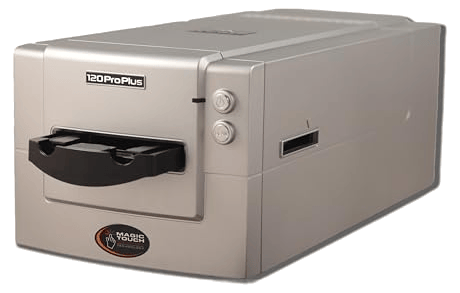
The Pacific Image PrimeFilm 120 Pro Plus is the scanner to buy if you shoot or inherited medium-format film. It scans 120 film in frame sizes from 6x4.5 to 6x12, and it takes 35mm strips and mounted slides too. No other scanner on this list takes 120 film.
It uses a true RGB linear CCD sensor at 6,400 dpi, so each pixel records real red, green and blue values. Pacific Image's CyberView X software includes Magic Touch infrared dust and scratch removal, multi-pass exposure for shadow detail, fading-color correction and grain reduction. It also handles half-frame 35mm. Pacific Image says this model scans negatives four times faster than its previous generation.
Each holder load is small. It takes one or two 6x4.5 or 6x6 frames but only one 6x7, 6x8, 6x9 or 6x12 frame, and you move the holder by hand. CyberView X is less familiar than SilverFast, so expect some learning. If all your film is 35mm, a Plustek scanner such as the 8300i SE is the simpler choice. If you only want quick reference images of medium-format film, a lab scan of a few rolls may cost less than this scanner.
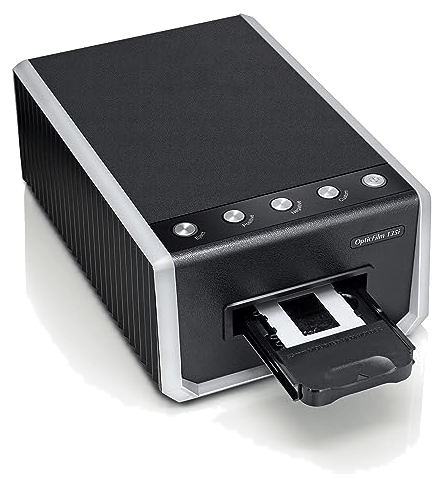
The Plustek OpticFilm 135i is for people with whole rolls to digitize. Instead of moving a holder frame by frame, you load a full 35mm strip or a set of mounted slides and the scanner works through the holder on its own. The holder also tells the scanner whether it holds negatives or slides.
It keeps a 7,200 dpi optical resolution and a built-in infrared channel for dust and scratch removal. Plustek bundles QuickScan Plus rather than SilverFast. QuickScan is simpler, and it can send scans straight to Photoshop if you already own it. The scanner also accepts half-frame strips, and an optional holder takes panoramic frames up to 226 mm wide.
Batch scanning saves your attention, not the scanner's time. Plustek lists about 52 seconds for the full holder at 600 dpi with infrared, about 6 minutes at 3,600 dpi and about 25 minutes at 7,200 dpi. Start a full-resolution run and leave it. Its 3.4 dynamic range is a little lower than the 3.6 on the 8300i SE, and for careful work on a few frames the 8300i SE's SilverFast software gives you more control.
The Plustek OpticFilm 8100 is the best choice among the Plusteks for black-and-white film. It has the same 7,200 dpi resolution and SilverFast SE Plus 9 software as the 8300i SE, but no infrared channel.
That missing channel matters less than it sounds for some film. Infrared cleaning cannot see through the silver in traditional black-and-white negatives, so it does not work on them. The 8100 uses SilverFast SRDx instead, a software tool that finds and retouches dust and scratches from the image itself. Plustek recommends it for silver black-and-white film and Kodachrome. If you shoot black-and-white film, you do not need to pay for infrared.
Choose the 8300i SE instead if you scan color negatives or slides, especially old ones. Without infrared, every dust spot on color film is yours to remove in SilverFast or your photo editor.
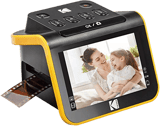
The Kodak Slide N Scan is the best choice for saving family photos without a computer. Its 5-inch screen shows each frame as you load it. You can set the film type and adjust brightness and color on the scanner, then press one button to save a JPEG to an SD card.
It takes 35mm, 110 and 126 color and black-and-white negatives, plus mounted slides in those sizes. The easy-load tray feeds frames continuously, so you do not have to remove the holder for every picture. An HDMI cable lets you show scans on a TV. A USB-C cable connects it to a computer when you want to copy files.
Kodak's specifications list a 14 MP sensor, and the 22 MP setting is interpolated. It adds pixels but not detail. The files are good for sharing and viewing on a screen, but they do not match the 7,200 dpi Plustek scanners for large prints. There is no dust or scratch removal and no adjustment beyond brightness and color. You also need your own SD card, up to 32 GB, and a power adapter or computer USB port to power it.
If you have Super 8 or 8mm home movies as well as photos, the Kodak SCANZA covers both. For a little more native detail, look at the Magnasonic All-in-One.
7. Magnasonic All-in-One 24MP Film Scanner
| Film Formats |
Film Formats
35mm, 110, 126 and Super 8 film, slides
|
| Resolution |
Resolution
16 MP sensor (24 MP interpolated)
|
| Dust Removal |
Dust Removal
None built in
|
| Scanning Workflow |
Scanning Workflow
No computer, 5-inch screen, saves to SD card
|
The Magnasonic All-in-One 24MP Film Scanner is the standalone scanner with the largest sensor here. Magnasonic lists a 16 MP sensor, more real pixels than the 14 MP sensors in the Kodak models. The 24 MP setting is interpolated, so treat 16 MP as the true capture size.
It handles 35mm, 110 and 126 film and slides, plus single frames from Super 8 film. You can adjust brightness and red, green and blue levels, or mirror and flip the image, on the 5-inch screen before you save to an SD card. HDMI output and a slideshow mode let you show the results on a TV.
Like the other standalone scanners, it does not take 120 film and has no dust or scratch removal. Clean your film before scanning and plan for retouching on damaged frames. Its Super 8 support captures still frames only, not a movie. The Kodak Slide N Scan has the same screen size and HDMI output if you prefer Kodak's easy-load tray.

8. Kodak SCANZA
| Film Formats |
Film Formats
35mm, 110, 126, Super 8 and 8mm film, slides
|
| Resolution |
Resolution
14 MP sensor (22 MP interpolated)
|
| Dust Removal |
Dust Removal
None built in
|
| Scanning Workflow |
Scanning Workflow
No computer, 3.5-inch tilting screen, saves to SD card
|
The Kodak SCANZA is the standalone scanner for mixed archives that include home-movie film. It takes 35mm, 110 and 126 negatives and slides, plus single frames from Super 8 and 8mm film. No other scanner here takes 8mm.
The tilting 3.5-inch screen lets you preview and adjust brightness and color before saving JPEGs to an SD card. Kodak includes HDMI and USB cables and an AC adapter. It uses a 14 MP sensor with a 22 MP interpolated setting, the same as the Slide N Scan.
The movie support is for still frames. It does not turn a reel into a video. The smaller screen is also harder to judge than the 5-inch screens on the Slide N Scan and Magnasonic. If you have no movie film, the Slide N Scan is the more comfortable choice.
How to Choose a Film Scanner
The reviews above cover the main differences. These points answer the questions they leave open.
Real Resolution Versus File Size
A Plustek or Pacific Image scanner states its optical resolution in dots per inch. At 7,200 dpi, a 35mm frame comes out at about 69 megapixels. A standalone scanner states its sensor size and a larger interpolated setting. When you compare two standalone models, compare the sensor figure, not the interpolated one. For more on the units, see our guide to DPI vs PPI.
You do not need the highest setting for every frame. Scan a sharp frame at two settings and compare them at the size you will view or print. If the larger file adds nothing you need, the lower setting saves time and storage. Keep your film so you can scan selected frames again later.
Check the Computer Requirements
The computer scanners need a 64-bit Windows PC or a Mac. Plustek lists support for Apple Silicon Macs and current macOS versions, with at least 8 GB of RAM and up to 20 GB of free space for the SilverFast cache. Check that list against your computer before you buy, and remember that a 69-megapixel 48-bit scan makes a large file. A laptop for photo editing with plenty of storage makes the job easier.
Scanning Software
Start with the software that comes with the scanner. The Plustek models bundle SilverFast or QuickScan Plus, and the Pacific Image uses CyberView X. VueScan is a paid alternative that supports many scanners; check its list for your model first. Our VueScan vs SilverFast comparison explains the choice.
A photo editor does a different job. Adobe Lightroom or Capture One can take your scans further after you export them. See our list of the best photo editing software for more options.
FAQs About Film Scanners
Is a Film Scanner Worth It Over a Lab Scan?
Buying a scanner makes sense if you shoot film regularly or have a large archive to digitize. You choose which frames to scan and can go back to them at any time. For a small, one-off collection, compare the cost of the scanner and your time with a lab's scanning service. Either way, you still need to develop your film first. Our guide on how to digitize your photos covers the other options.
Can a Film Scanner Scan Prints?
No. Every scanner here is for negatives and slides, not paper photographs. If you need to digitize prints, read our list of the best photo scanners. Once your film is scanned, you can print your favorites at home with one of the best photo printers.
Does Infrared Dust Removal Work on Black-and-White Film?
Not on traditional silver-based black-and-white film. SilverFast's guidance says infrared correction cannot be used on it, and Kodachrome needs special care. For silver film, use software retouching such as SRDx and test one frame before you correct a whole set.
Conclusion: The Best Film Scanner
The Plustek OpticFilm 8300i SE is our top pick for most 35mm shooters. It gives you 7,200 dpi scans, infrared cleaning for color film and full control in SilverFast. Choose the Pacific Image PrimeFilm 120 Pro Plus if you have medium-format negatives.
The Kodak Slide N Scan is the simpler choice for previewing family negatives and slides and saving them without a computer. Whichever you choose, check that it takes your film size before you start your archive.