Two big names stand out when looking to create your own photography website: Zenfolio vs SmugMug. Both offer loads of tools and possibilities. But it can be confusing to figure out which is the best fit for your needs!
The interface observations and remaining screenshots below come from our original review. The plan sections have been checked against the providers’ October 2026 information. They do not represent a new hands-on test.
Let’s take a look at Smugmug vs Zenfolio. We’ll look at what they offer so that you can have more info when choosing one.
Note: As a disclaimer, I want to be clear that I’ve been using Squarespace for years, and used WordPress before that.

Basic Setup Comparisons: Zenfolio Vs Smugmug
SmugMug lists Direct, Portfolio and Pro, plus a custom Enterprise option. Zenfolio lists Basic, Professional and Advanced.
For a portfolio, compare the website, branding and selling features included in the plan you choose. SmugMug and Zenfolio provide feature matrices for this purpose. Zenfolio now lists a custom website, domain and logo across its plans.
I started a free trial and created both a Smugmug account and a Zenfolio one. Then I began to set up a new photography website with each service.
First I’ll talk about my experience with SmugMug.
The initial walk-through is very user-friendly. It guides you through selecting a theme, adding photos, and getting started on customisation.
The customization panels have a bit of a learning curve. You’ll need to be patient at first until you get a feel for where you can find different adjustments.
I changed a slideshow to a thumbnail gallery at some point. It was an accident, and I wasn’t able to figure out how to get the slideshow back after that. The interface definitely doesn’t feel intuitive.
When I started with Zenfolio, there were more pop-ups to guide me through the various parts of the screen. They also point out where different menus can be found.
I found the initial setup of selecting a theme and uploading photos to be smoother with Zenfolio. But I was overwhelmed by all the options for adjustments.
We’ll talk more about the good and bad of this in the next section. Overall, I found Zenfolio to be a bit more user-friendly during the basic setup. Especially for someone not very familiar with the world of website design.
Customization
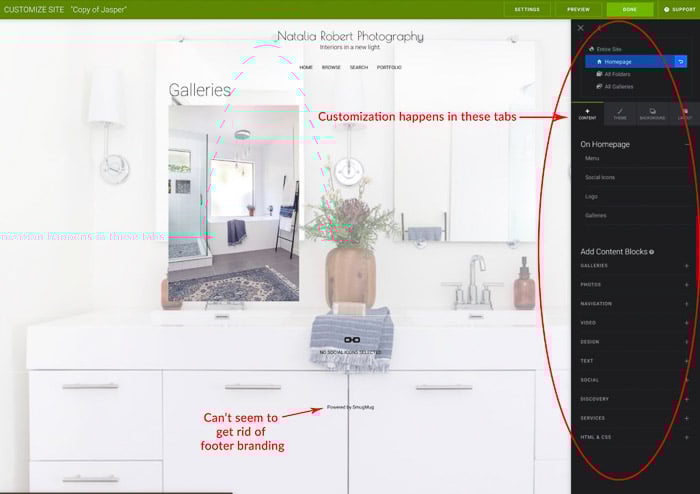
With SmugMug, you can literally click and drag a block of content onto any page.
The freedom to add and move content so much is lacking in Zenfolio. What Zenfolio does have is a very detailed customisation panel. You can change every aspect of your chosen theme.
The customization panels are a bit confusing on both Smugmug and Zenfolio. I felt both to be a bit choppy. The customization panels are broken down into different sections and tabs.
When it comes to adding in custom coding, Smugmug offers you the ability to use CSS or HTML. Zenfolio only appears to allow HTML. Zenfolio has loads of aspects to change within each theme. But Smugmug allows you more freedom to alter the theme itself by adding code or shifting content around.
For both services, the themes available offer great options for a variety of photography! Zenfolio even has the option to create your own theme from scratch. You can select everything from individual section fonts to branded colors.
Branding allowances depend on the current plan. Check the provider’s feature matrix before relying on the interface differences described in this original test.
Zenfolio has a definite advantage in that it allows you to erase any mention of Zenfolio from your site. That way your website can be a seamless branded experience.
SmugMug shows up on the footer without the option to erase. It’s also in the shopping cart during check-out.
In fact, the check-out page for Smugmug is basic and does not change to match your theme. Zenfolio has a check-out page that adjusts to match your chosen theme.
When it comes to their mobile sites, neither Zenfolio nor Smugmug let you edit it directly. As for social media, both websites offer the possibility to share your images.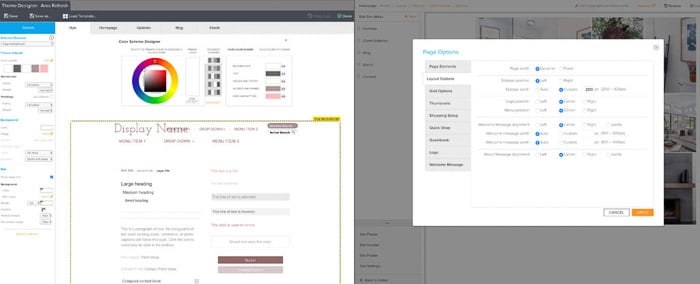
Setting Up to Sell
SmugMug lets you offer prints, whether digital or physical. They work with four printing labs (BayPhoto, WHCC, EZPrints, Loxley Color). This allows you to even offer drop shipping directly to your clients!
Once your price lists are set up, selling on Smugmug can be automated. Portfolio supports print and digital sales; Pro adds multiple custom price lists.
Use Smugmug’s current plan matrix to choose the selling tools you need, then set up a custom price list for your work.
Zenfolio also does a great job of offering options for selling photo products. You can connect to Mpix and Miller’s for prints and products. And Zenfolio also offers you the option to do self-fulfilled orders.
This means you can sell prints, collect payment, and then handle the actual printing and shipping yourself.
This is useful if you want to offer unique or handmade products or packaging. Or if you want to use a specific lab that is not already connected with Zenfolio.
Zenfolio describes Basic as a gallery-sharing plan and Professional as a plan for selling and growing a business. Compare its current selling and fulfillment options before choosing a subscription.
SmugMug includes unlimited JPEG storage, while Zenfolio’s photo and video allowances depend on the plan. Zenfolio’s Advanced plan lists unlimited JPEG storage with a separate video allowance.
Smugmug’s upload guide and Zenfolio’s upload guidelines distinguish individual file limits from total storage. Zenfolio’s current photo-file limit is 100 MB. Check the guide for your platform and plan before exporting a large batch.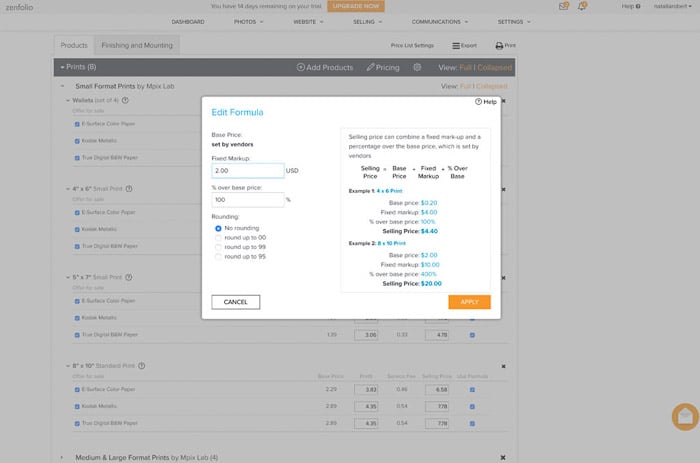
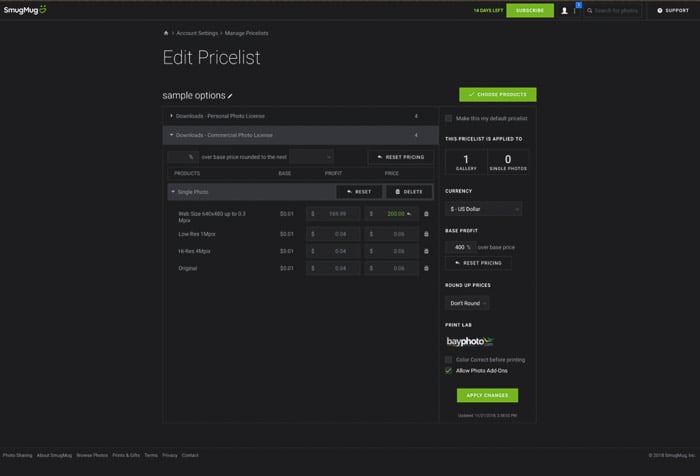
Setting up the price lists on either site is very similar. While the setup is a bit complicated at first, it does allow you to get detailed. Zenfolio’s price list allows you to dictate the mark-up and a fixed up-charge. But it doesn’t show you the profit after commission fees.
SmugMug seemed more complicated in my original test, but its price-list screen showed the profit after fees. Before setting prices on Smugmug or Zenfolio, check the current selling fees and how each provider calculates them.
You can also have the prices rounded up. There are options on both sites to dictate how to round up prices when calculating base costs and commission rates.
Both Smugmug and Zenfolio offer similar possibilities when it comes to selling options. The higher level packages of both services offer options like boutique packaging, event galleries and lists, branded packaging, custom package offerings for certain galleries.
These options are fantastic if you’re a professional photographer who specialises in weddings, families, or events!
Other Notable Features
One of SmugMug’s big downfalls is its inability to offer an integrated blog. To do a blog you would need to connect to a third-party site, like a WordPress blog, and redirect traffic.
Zenfolio, however, offers blogging as a page type that can be added just like any other page on your site.
If, for example, you photograph weddings and blog about each one, then this could be a deal-breaker. Zenfolio’s blog pages are automatically set up to allow for posts. They show posting date, keywords, and comments.
While this is not something that stands out on all monitors, Smugmug has sharper image quality over Zenfolio. This can be seen on high-resolution monitors like an iMac with Retina 5K display. It most likely would not be noticeable on lower resolution monitors.
One final feature worth noting in Zenfolio is the ability to create triggered emails for your contacts. This allows you to tell Zenfolio to send a pre-written template email when certain actions are taken.
If a contact marks favorite photos in a gallery, you can send an email reminding them to go back and complete the purchase for prints before an order deadline.
SmugMug does let you track your contacts too. But it doesn’t have the ability to create triggered email templates for specific actions.
This can be a major benefit if your photography business depends on online print sales as an integral part of the client process!
One final feature of both Smugmug and Zenfolio is their integration into Lightroom. With the use of plugins, you can upload pictures directly from your gallery to your Smugmug or Zenfolio website.
Conclusion
It can feel overwhelming to compare Zenfolio vs Smugmug, but your needs will dictate which service is the best fit for you.
SmugMug seems like a better fit for portfolio sites or non-wedding event photographers. Zenfolio feels like a better fit for photographers who do weddings, family portraits, travel, or engagements.
The key differences are the blogging abilities, the commission rates, lab options for print sales, and the quality of pictures on high-resolution monitors.
When looking at ease of use, Zenfolio and Smugmug are comparable. I felt less of a learning curve with Zenfolio, and so would lean toward using it if ease of usability is a top concern.