Photography games give you a reason to pick up your camera when you’re stuck for ideas. Try guessing locations from close-ups, drawing photography terms with friends, or photographing one object ten different ways. A phone camera is enough for the hands-on activities below.
These 12 ideas include solo challenges, games for groups and students, and video games that use a camera in their story or puzzles. For a quick classroom game, start with Photography Pictionary. To get shooting straight away, try the different-angles challenge. If you want to play on screen, look at Life Is Strange or Snapshot.
You can set your own time limit and photo count. For a group, agree on the rules before you start, then leave a few minutes to share the results.
12. Photography Games: Guess Where a Photo Was Taken

Choose five photos of places your friends know and show them one at a time. Give one point for each correct location. To make the game harder, start with a close-up of a door, sign, texture, or other detail, then reveal the wider scene after everyone has guessed.
You can take the pictures yourself or use photos from your own archive. For a classroom version, keep the locations within an agreed area and let pairs take turns making and solving the clues.
If you want to play online, GeoGuessr asks you to identify a location from its surroundings. Its Explorer mode lets you choose a country. Use signs, buildings, vegetation, and road details as clues. For the version with your own photos, think about which details make a place recognisable and which give the answer away too quickly.
11. Photography Pictionary

This is a game for two or more people, or teams. You need paper or a whiteboard, a pen, a timer, and a set of photography words. One player draws while the others guess the word before the time runs out.
Write the words on slips of paper and pick them from a hat. Here are a few photography terms that might result in silly or creative drawings:
- Portrait photography
- Shutter
- Tripod
- Cheese (in terms of smiling)
- Pinhole camera
- Photoshop
Allow 30–60 seconds for each turn and award one point for a correct guess. Take turns drawing so everyone has a go. For beginners, explain an unfamiliar term after the round. For a harder version, use ideas such as depth of field or motion blur, and ban written words and numbers in the drawing.
10. Life Is Strange

Life Is Strange is a story-driven adventure about Max Caulfield, a photography student who discovers she can rewind time. Your choices affect later events as Max and her friend Chloe investigate a missing student. The original game’s first episode is listed as free on Steam.
Photography appears through collectible photo opportunities. Max’s journal gives hints about the pictures to find, and some require you to perform actions before you can take them. Treat this as a story with a photo hunt woven through it. Check the store’s age rating and system requirements before choosing it for a group.
9. Take Photos for a Specific Theme Every Week

Choose a specific theme for each week and make a small set of pictures that explores it. You can play on your own or agree on the same theme with friends. Start with four weeks if a whole year feels too much.
Here are a few ideas:
- Routine
- Identity
- Stars
- Nostalgia
- In love
- Soft focus
Keep the brief open enough to allow different interpretations. For “routine,” you could photograph breakfast, a familiar walk, or objects left in the same place every day.
At the end of the week, choose one photo and explain how it answers the theme. If you play as a group, compare the different approaches before choosing the next prompt. Repeating this process gives you a series to look back on as you develop your style.
8. Photograph the Same Object From Different Angles

Find one ordinary object, such as a mug, chair, or plant, and photograph it from different angles. Give yourself ten frames. Keep the object in place so you have to change your own viewpoint.
Start at eye level, then shoot from above, near the ground, from behind, and close to one detail. Move around the object and watch how its outline overlaps with the background. Make each frame different enough that you can explain why you took it.
Review the ten photos together. Which angle gives the subject the strongest shape? Which hides a distracting background? For a second round, keep your favourite viewpoint and change just one setting or the direction of the light. Comparing one change at a time makes the result easier to judge.
7. Photograph Your Family in Order From Oldest to Youngest

Turn a gathering into a family photo project by making a portrait of each willing family member. Arrange the finished pictures from oldest to youngest, or ask the group to sort them into that order without looking at names.
Decide how you’ll show the finished set: print the photos or arrange them in an online gallery. Ask everyone to help choose their picture and decide who can see the finished set.
You can make matching portraits in one spot or take candid photos as people talk, cook, or play. Choose one approach for the first round so the set feels connected. Let everyone know what the pictures are for before you begin.
To make this experience fun for everyone, you can ask members of your family to take photos themselves. This is a fun project for adults and children alike.
6. Gurushots

Gurushots turns photo challenges into a game built around submissions and community voting. Pick a theme that interests you, read its rules, and choose pictures that answer the brief.
Contests give you a deadline to work towards. On GuruShots, other account holders can vote for submitted photos, and votes affect your position in a challenge. Keep the exercise about interpreting a theme: after each challenge, choose one picture and note what you would change next time.
The service has optional paid items, including Swaps, Fills, and Keys. Read the current rules and upload terms before taking part. The screenshot above shows an earlier version of the site, so the current layout may differ.
5. Shoot From the Hip

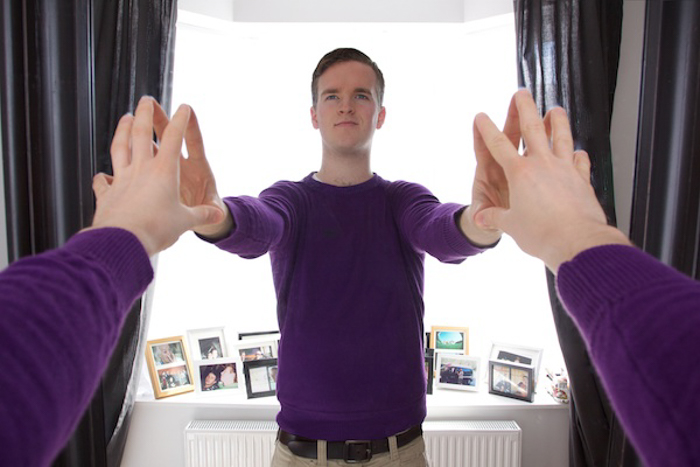
Shooting from the hip means holding the camera around waist height and taking a picture without using the viewfinder at your eye. It gives you a lower viewpoint and makes framing less predictable. It is a technique used in candid and street photography.
Start with a still subject in an open space. Take five frames from hip height, then check where the subject landed in each one. Adjust the camera’s tilt and try again. Keep your eyes open and watch your surroundings as you work.
Once you can place the subject roughly where you want it, try the game at a family gathering with people who are happy to be photographed. Use a wide view to leave yourself room around the subject, then compare the results with a photograph taken at eye level.
4. Take Photos in B&W Mode Only

Choose a black-and-white setting in your camera or phone, if it has one, and use it for a short photo walk. Set a goal such as five pictures of shadows, textures, or shapes. Keep the same subject area so you spend your time looking for pictures.
For a longer challenge, take 50 photos in black and white. Review them in small groups and choose the strongest frame from each group. Look for a subject that stands out from its background and for light that makes its shape easy to read.
You can also make a colour and a monochrome version of the same scene. Compare which details draw your eye in each. A bright colour may catch your attention in one version, while a shadow or pattern becomes the subject in the other.
3. Take Photos Using One Camera App on Your Smartphone

Smartphone photography gives you a way to play when you don’t have your usual camera with you. Choose one camera app other than the standard one on your phone, and use it for the whole session.
Try the Lenses in Snapchat to take humorous photos. For manual controls, the options include Manual on iPhone and Camera FV-5 on Android. Check the app listing for your device before downloading; available controls can depend on the phone.
Give yourself one subject and ten pictures. Learn one control or effect, then see how many different results you can make with it. Finish by choosing three photos that work together. You can repeat the game with the same app the next day and a different subject.
2. Re-Create Your Favourite Photo(s)

Pick one photograph, film still, sketch, or painting and work out how you could re-create it with your camera. Start with an image whose setting, props, and lighting you can reasonably arrange.
Break it into a few decisions: where is the camera, where is the light, how is the subject posed, and what is included at the edges? Try matching those choices one at a time. You don’t need an identical location to study the relationship between light, viewpoint, and subject.
If the photographer explains their work in a video or written lesson, use it to understand their choices. Photography tutorials and ebooks can also help you work on a technique you need for the picture.
Keep the result as a learning exercise. Before sharing a re-creation publicly, ask the original creator for permission, credit them, and make the connection to their work clear. Then take another photo that uses what you learned with your own subject or arrangement.
1. Snapshot

Snapshot is a puzzle platformer from Retro Affect about a robot named Pic. His camera can capture objects, remove them from the world, and place them somewhere else. You can rotate a captured image before putting its contents back into the scene.
That turns taking a picture into a way to move obstacles and solve puzzles. Think of it as a camera-themed puzzle game. For an exercise with your own camera afterwards, try the different-angles challenge above.
Snapshot is an older release. Check the current store listing and system requirements before buying, especially if you use a recent Mac.
Conclusion
Choose one photography game to try today. Pictionary suits a group with a few minutes to spare, while the different-angles challenge needs only one subject and a camera. The weekly-theme game gives you a reason to keep shooting after the first session.
Whatever you choose, finish by looking at the results. Pick a favourite, say what makes it work, and decide what you want to try in the next round.
We have a great post on using symbolism in photography to check out next!